Virtual Staging vs Real Staging: Costs, Speed, and ROI
Virtual staging vs real staging compared on cost, speed, realism, and ROI. Practical guidance for real estate and design pros in 2026.
A vacant three-bedroom hits your inbox on Thursday. Photography is booked for Monday, the seller expects the listing live by Wednesday, and the broker wants the rooms to look furnished in every online channel. The local stager can install furniture for $1,800, but only if the delivery window holds. An overnight 24-image AI staging package would protect the launch schedule, yet it won't change what buyers experience when they walk through the front door.
That decision is the issue in virtual staging vs real staging. The cheapest image isn't automatically the cheapest listing strategy, and the fastest launch doesn't automatically produce the strongest buyer confidence. You need to weigh the invoice, carrying time, property type, showing experience, and disclosure workflow together.
Table of Contents
- Choosing Between Virtual and Physical Staging
- What Each Method Actually Delivers
- Five Criteria That Decide the Choice
- Real Cost Breakdown for a Typical Listing
- Matching the Method to the Listing
- Disclosure Rules and Workflow
- Which Method Wins and When to Start
- Frequently Asked Questions
Choosing Between Virtual and Physical Staging
By Thursday afternoon, the agent has three operational deadlines competing for attention. The photographer needs a room plan before the Monday shoot, the MLS photo set has to be finalized before Wednesday's launch, and the seller wants a furniture-ready presentation without delaying the listing.
The physical option looks persuasive because buyers would see the same furniture online and in person. A local stager has quoted $1,800 for installation, but that price only works if the crew, inventory, delivery, and access all line up. A missed scheduling window can push photography, editing, and publication into the following week.
The virtual option solves a different problem. The agent can photograph the empty rooms, select a 24-image package, and receive furnished versions overnight. That gives the seller the polished gallery they expect while preserving the Monday photography appointment. The images can show a living room layout, a bedroom use, and a practical arrangement for the spare room without moving rental furniture into the property.
The risk appears in the neighborhood context. If the local average is 21 days on market, a launch delay can consume a meaningful part of the period in which a new listing still feels fresh to buyers. That figure belongs in the agent's planning model, not as a guaranteed market outcome. Faster publication may create earlier inquiry, but it doesn't prove that virtual staging will shorten the sale.
Practical rule: If the listing must go live within a few days, choose the method that protects the photography and MLS deadline first. Then decide how much in-person impact the property needs.
The seller's expectation also matters. A vacant home can look cold in photos, so virtual furniture may improve online interpretation. But if the seller plans an open house immediately after launch, physical staging may justify its higher logistical burden. The right choice depends on whether the listing's first conversion point is the online click or the in-person showing.
What Each Method Actually Delivers
Virtual staging is a post-production workflow. A photographer captures the room as it exists, then a rendering service or tool adds furniture, decor, lighting, and sometimes a new style to the image. The output is tied to the original camera angle. It changes the listing photo, not the room.
Physical staging is a logistics operation. A stager reviews the property, measures rooms, selects rental inventory, coordinates delivery, places the furniture, styles the space, and later arranges removal. The result appears in the photographs and remains present during tours, inspections, and open houses.
The cost gap is substantial, but exact quotes depend on scope, market, number of rooms, rental duration, and service level. Industry summaries report virtual staging at roughly $1 to $129 per photo, while full-home physical staging is often cited around $2,300 to $3,200. A separate market summary places physical staging around $832 to $2,917 per listing and AI virtual staging around $0.45 to $75 per image, so agents should treat vendor quotes as ranges rather than fixed tariffs. See this operational overview of AI virtual staging workflows before comparing proposals.
| Attribute | Virtual (AI) Staging | Physical Staging |
|---|---|---|
| What changes | Listing photos receive digital furniture, decor, and lighting | Rental furniture and decor are installed in the property |
| Primary benefit | Fast online presentation and flexible visual variations | Consistent online and in-person buyer experience |
| Turnaround | Often measured in minutes to a day, depending on workflow | Requires consultation, scheduling, delivery, setup, and removal |
| Cost profile | Per-image or package pricing | Installation, rental, delivery, pickup, and possible extension charges |
| Main limitation | Exists only in the selected photographs | Takes more time, coordination, space, and budget |
| Best use | Vacant, occupied, remote, or deadline-sensitive listings | Vacant, premium, unusual, or showing-heavy listings |
The practical distinction is simple. Virtual staging sells a visual possibility through a controlled image. Physical staging demonstrates how the property feels and functions when a buyer is standing inside it.
Five Criteria That Decide the Choice
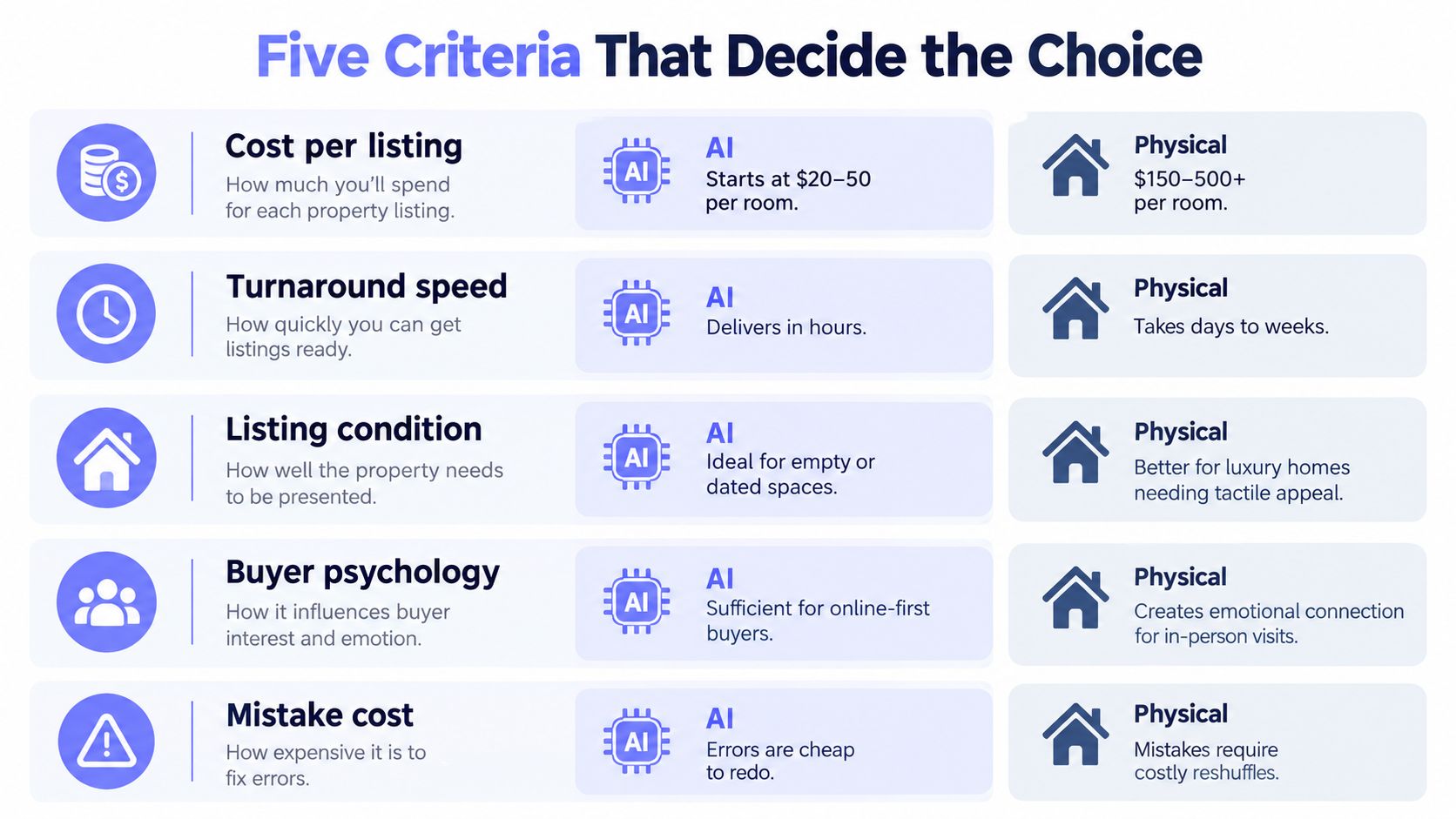
A broker can usually make the first decision in under a minute by scoring the listing against five criteria. The verdict shouldn't come from a generic feature checklist. It should reflect where the buyer is most likely to make a commitment.
Cost per listing
AI staging wins when the budget is tight or only a few rooms need help. Physical staging can make more sense when a home will remain furnished through an extended marketing period, because per-image savings don't capture the value of an in-person setup that stays consistent across repeated showings.
Verdict: Choose virtual for a limited presentation budget. Consider physical when the listing needs sustained, whole-home presentation.
Turnaround speed
Virtual staging dominates short turns. Some workflows return images in minutes, while outsourced editing may take longer. Physical staging needs vendor availability, access, delivery, installation, and removal, with setup commonly taking 1 to 5 days according to independent real-estate guidance from Homes.com.
Verdict: AI wins when the launch window is under 48 hours. Physical staging wins only when the schedule has room for coordination.
Realism and walkthrough impact
A digitally furnished room can help a browser understand scale and purpose, but it can't add furniture, texture, lighting, or atmosphere to the actual showing. Physical staging reinforces the same visual story from the listing gallery through the tour.
Verdict: Physical staging wins when buyers are expected to linger in the property. Virtual staging is sufficient when online interpretation carries most of the early decision.
Portfolio scalability
Virtual staging scales across multiple listings because the agent can submit images without booking trucks, crews, or furniture inventory. Physical staging scales through vendor relationships and scheduling capacity, which creates a bottleneck when several properties launch together.
Verdict: AI is the more repeatable portfolio workflow. Physical staging remains more powerful per property when the inventory and schedule support it.
Disclosure and compliance risk
Both methods can create risk, but the failure differs. Physical staging can make a room appear more functional than it is, while virtual staging can create a mismatch between the online image and the actual condition. The agent must label altered images and keep the original version available, as outlined in virtual staging disclosure guidance.
Verdict: Neither method is risk-free. Virtual staging requires stronger asset control, while physical staging requires accurate representation of the room's real dimensions and condition.
Real Cost Breakdown for a Typical Listing
A vacant home scheduled to launch next week can face two very different bills. Physical staging may require furniture rental, delivery, pickup, styling labor, deposits, insurance, storage, and extension fees if the property remains active. Virtual staging removes much of that logistics burden, but the listing still needs usable photography, editing, review, and image approvals.
A staging budget should begin with the listing's total cost, not the vendor's headline price. Use this virtual staging cost breakdown to frame the image budget, then add the operational costs around it.
Virtual staging can be regenerated quickly when a room style changes. The source photograph still controls the result. Poor exposure, incorrect white balance, reflections, or an unsuitable camera height may make a reshoot necessary, turning a low image fee into another photography appointment.
The Florida Realtors summary of virtual staging reports that AI-powered virtual staging can reduce staging expenses by up to 97%. It also states that physical staging commonly costs thousands of dollars per home, while virtual staging is often quoted at roughly $1 to $129 per photo, compared with about $2,300 to $3,200 for full-home physical staging.
| Cost Line | Physical Staging | Virtual Staging |
|---|---|---|
| Furniture and decor | Rental inventory for selected rooms | Digital furniture, decor, and lighting |
| Setup | Delivery, placement, styling labor, and access coordination | Upload, style selection, generation, and review |
| Ongoing exposure | Rental extensions, storage, and possible insurance or deposits | Additional images, revisions, and exports |
| Photography dependency | Photos capture the installed staging | Good source photos remain essential |
| Hidden failure cost | Rescheduling, damaged items, rush delivery, or a second install | Reshoot, retouching, unrealistic edits, or disclosure errors |
| Cost range to plan around | Use the vendor's full quote and rental terms | Use per-image or package pricing plus revision allowance |
Before the listing goes live, put four lines into the worksheet:
- Base staging invoice: Record the physical quote or virtual image package.
- Launch risk: Estimate the effect of a delayed photography or installation appointment on the publication schedule.
- Carry exposure: Add ongoing ownership and marketing costs if staging or launch delays extend the listing.
- Correction reserve: Allow for reshoots, revisions, furniture changes, storage, or a second showing setup.
RESA reports that staged homes sold in 24 days compared with 90 days for unstaged properties, a 73% reduction in time on market in its historical statistics. The RESA statistics page also reports staged inventory averages such as 12 days and 19 days in different quarters, along with sale-to-list ratios reaching 109% across a sample of 129 homes. These figures support staging as a general marketing tactic, but they do not separate virtual staging from physical staging or forecast a particular listing's result.
The useful calculation is total launch cost plus expected carrying cost. Compare the fee, schedule, correction risk, and likely days on market for the property in front of you.
Matching the Method to the Listing
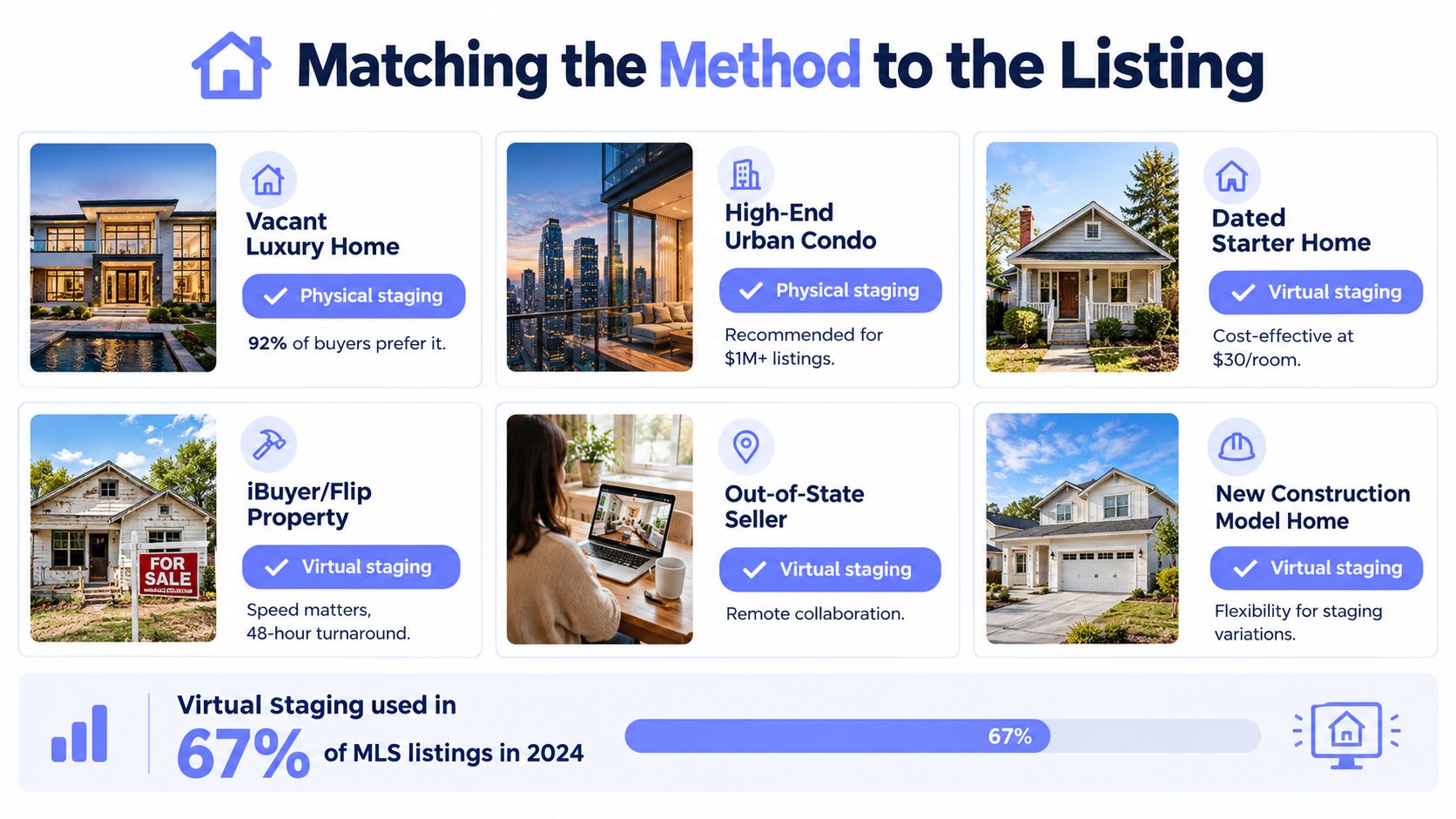
Start with the buyer's likely path through the property. If buyers need to understand the room online, virtual staging may solve the immediate problem. If the sale depends on a memorable walkthrough, furniture that exists in the room carries more weight.
Where physical staging earns its place
A vacant luxury home often needs physical staging because the price and buyer expectation make the showing experience part of the product. High-end urban condos can also benefit when buyers compare finishes, views, proportions, and lifestyle details in person. Awkward layouts are another strong use case. A real sofa, dining table, or bed can prove that the room functions without asking the buyer to trust a photograph.
For a $1.8 million luxury listing, the physical option deserves serious consideration even when the online gallery looks strong. The seller isn't only buying attractive photos. They're buying continuity between the first impression and the appointment.
Where virtual staging is practical
A $425,000 starter home with a limited marketing budget may need online clarity more than a full furniture installation. A tenant-occupied rental may not allow movers to rearrange the property, while a remote or rural listing may be difficult for a stager to service efficiently. An investor's flip may also favor speed, especially when the rooms are clean but empty and the marketing team needs several visual options quickly.
A probate estate with dated furnishings presents a more careful decision. Virtual edits can show a cleaner design direction, but the original condition must remain clear. If the furniture blocks circulation or conceals damage, digital beautification won't replace decluttering, repairs, or honest photography.
The before-and-after staging examples can help a team evaluate whether the visual change clarifies the room or merely makes it look different.
When hybrid staging makes sense
A hybrid plan can put physical furniture in the living room and primary bedroom while using virtual staging for a secondary bedroom, basement, or bonus room. That approach preserves some in-person emotional impact without paying to furnish every space.
Ask one triage question before calling a stager: Will the buyer make the important decision from the listing gallery, or after walking through the property? The answer usually points toward the method that deserves the larger share of the budget.
Disclosure Rules and Workflow
Disclosure starts when the original photograph is saved, not when the listing is ready to publish. Treat every image as a managed asset across MLS uploads, social crops, print materials, email campaigns, portal exports, and later price changes.
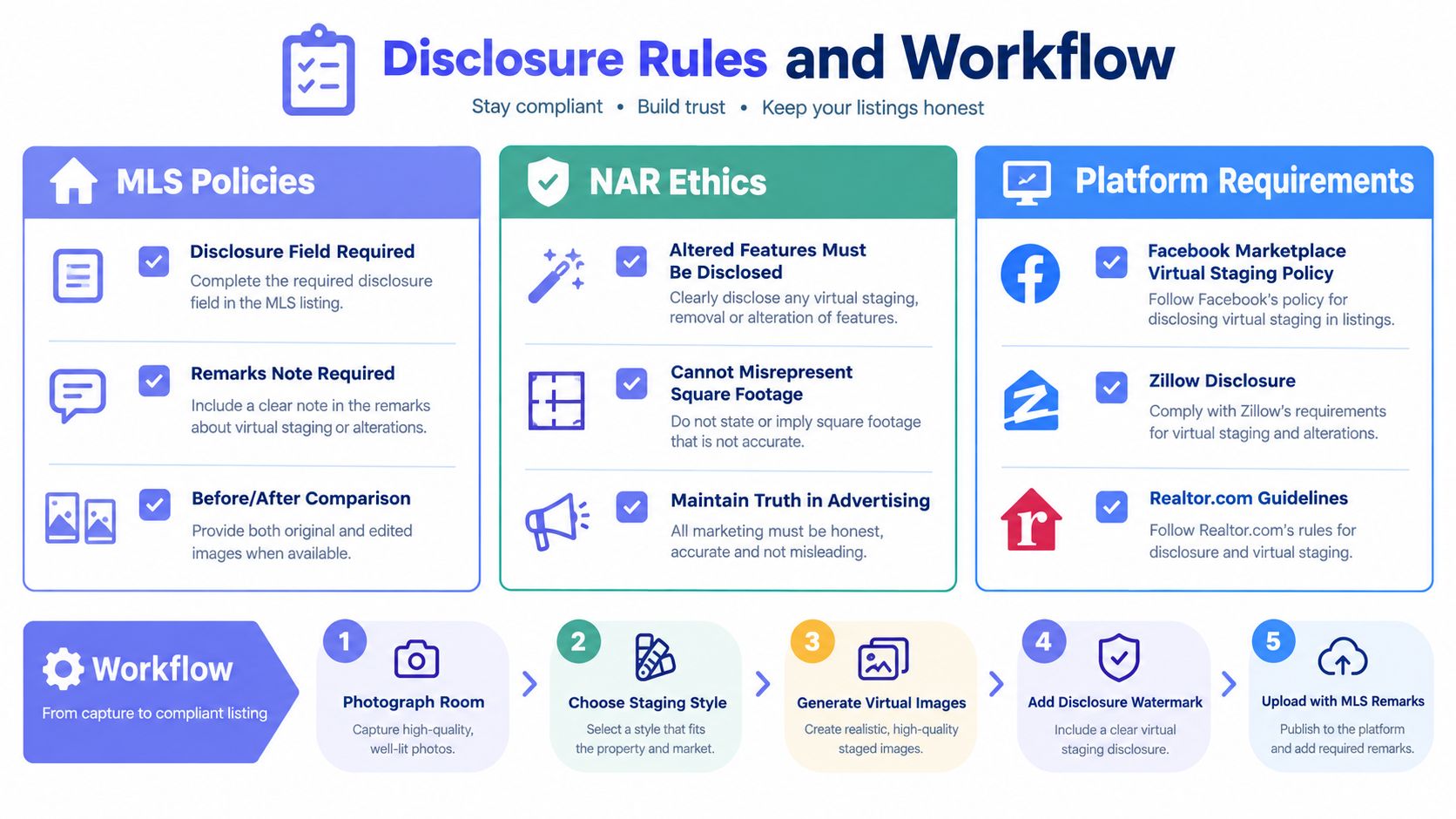
Guidance commonly says that virtually staged photos should be labeled in the image itself or in the listing remarks, with original unstaged photos kept available. California's 2026 rule requires conspicuous disclosure on or adjacent to the image, plus a link, URL, or QR code to the original unaltered image, according to coverage of virtual staging disclosure requirements. Teams building the process can also review this how to do virtual staging guide before preparing edited assets.
The working file system
Save the untouched photograph in a controlled folder before editing. Give the staged export a separate filename, preserve original metadata where required, and record which version appears in each channel. The file structure should make the unaltered image easy to retrieve after publication.
Use this handoff sequence:
- Save the original: Store the unaltered room image with the listing's master assets.
- Create the edited version: Add furniture and decor without changing structural facts, room dimensions, or visible property condition.
- Add the disclosure: Place the required label on the image or in the appropriate MLS field and remarks.
- Publish the original access path: Keep the unaltered image available wherever the platform or local rules require it.
- Audit every reuse: Check MLS, brokerage pages, social posts, flyers, email campaigns, and portal exports.
What commonly goes wrong
An agent may label a staged image in the MLS but omit the disclosure from a social-media crop. Another may include the original in the first upload, then remove it after a price change or photo reorder. Print flyers create a separate failure point because digital checks do not cover printed materials.
Operational standard: The transaction coordinator should verify every public image, not just the MLS record, before launch.
Tell buyers during the showing that the room was virtually furnished if the physical property differs from the image. Show the original beside the staged version on an iPad, printed board, or listing page. That comparison clarifies what exists today and prevents the edited image from being interpreted as a promise about the room's current condition.
Which Method Wins and When to Start
A vacant luxury home launching next week may justify physical furniture, while an occupied seller home may need a digital presentation because moving belongings is impractical. Choose the method according to the listing's expected buyer experience, launch deadline, and total carrying cost, not the image fee alone.
| Listing Scenario | Budget Range | Timeline | Recommended Method | Why It Wins |
|---|---|---|---|---|
| Vacant luxury home | Higher staging budget | Flexible | Physical staging | Gives premium buyers a consistent online and in-person experience |
| High-end urban condo | Higher staging budget | Planned launch | Physical or hybrid | Defines scale, flow, and lifestyle during tours |
| Occupied seller home | Limited to moderate | Fast or flexible | Virtual staging | Avoids moving furniture and supports cleaner listing imagery |
| Investor flip | Controlled marketing budget | Compressed | Virtual staging | Produces presentation options without delivery logistics |
| Remote or rural property | Depends on vendor access | Often deadline-sensitive | Virtual staging | Reduces dependence on local staging inventory and travel |
| Secondary rooms in a hybrid plan | Targeted room budget | Flexible | Virtual staging | Extends the visual story without furnishing every room |
Physical staging is strongest when the property is vacant, premium, and likely to receive serious in-person attention. Furniture establishes scale, circulation, and the room's intended use during a tour. It also creates a consistent experience between the listing photos and the property itself, provided the rental remains in place through the showing period.
Use the 24 days versus 90 days historical benchmark only as a general staging reference. Model this listing's specific carrying cost, showing plan, and likely buyer response before choosing a method. A shorter marketing period can offset a higher staging bill, while a cheaper presentation can become expensive if weak showings lead to price reductions, extra photography, or additional weeks on the market.
Virtual staging has the stronger speed and budget case when the seller needs the listing live within 72 hours, the home is occupied, or furniture delivery and extensions would create scheduling risk. It can also give an investor several presentation options without storing or moving physical pieces. The broader virtual staging market is growing, but market expansion does not guarantee better inquiries or a faster sale for an individual listing.
Vizcraft Virtual Staging costs $29 per listing for 8 staged JPEGs from empty for-sale listing photos of one property, with modern, warm, or coastal looks. This purchase is separate from monthly rendering plans and credit packs. Review each image against the original and apply the disclosure rules for your market.
Before committing to a larger budget, run the same listing through the free trial and compare the staged hero image with the empty-room photograph. Track showing requests, buyer comments, inquiry quality, and whether the property delivers what the online image suggests. Click volume alone does not establish return on investment.
Build the decision around total listing cost: staging, photography, revisions, rental extensions, reshoots, price reductions, and the carrying cost of additional market time. Pricing and exact plan details may change, so confirm the current offer before budgeting.
Frequently Asked Questions
Is virtual staging cheaper than real staging?
Usually, yes. Industry summaries report virtual staging at roughly $1 to $129 per photo, while full-home physical staging is often cited around $2,300 to $3,200. The final comparison should include photography, revisions, delivery, rental extensions, storage, and any reshoot or correction costs.
Does physical staging sell homes faster?
RESA reports that staged homes sold in 24 days compared with 90 days for unstaged properties, but that historical result covers staging generally rather than proving that physical staging always beats virtual staging. Physical staging can support the in-person experience, while virtual staging primarily improves the online presentation.
Do I have to disclose virtual staging?
You should clearly label virtually staged images and keep the original unaltered photographs available. Requirements vary by MLS and jurisdiction, and California's 2026 rule adds conspicuous disclosure plus a link, URL, or QR code to the original image.
Is hybrid staging worth considering?
It can be useful when the living room and primary bedroom need a real walkthrough impact, while secondary rooms only need online clarification. The approach controls physical rental costs without leaving the entire listing dependent on digitally furnished images.
How quickly can AI staging produce an image?
Vizcraft Virtual Staging costs $29 per listing for 8 staged JPEGs from empty for-sale listing photos of one property, with modern, warm, or coastal looks. This purchase is separate from monthly rendering plans and credit packs. Review each image against the original and apply the disclosure rules for your market.
Vizcraft Virtual Staging costs $29 per listing for 8 staged JPEGs from empty for-sale listing photos of one property, with modern, warm, or coastal looks. This purchase is separate from monthly rendering plans and credit packs. Review each image against the original and apply the disclosure rules for your market.