 Vizcraft
At 3 p.m. on a Friday, the question usually isn't whether virtual staging works. It's whether you can get clean, believable images onto the listing before the weekend without starting a compliance problem or burning budget on the wrong rooms.
That's where virtual staging software for real estate can help. 360iResearch's virtual staging market analysis offers broader market context, but a listing team has a more immediate question: which workflow produces usable images within its deadline and budget?
The decision isn't “AI or not.” It's narrower than that. You're choosing between seconds-level renders, hours-to-days human review, disclosure obligations, and whether the result looks good enough to survive zooming in on a portal gallery.
Table of Contents
- A Friday Afternoon on the Listings Desk
- What Virtual Staging Software Does
- Side-by-Side Comparison of Virtual Staging Tools
- Cost per Image and Cost per Listing
- Recommended Workflow for Listing Photos
- Which Tool Fits Which Agent or Broker
- Frequently Asked Questions
A Friday Afternoon on the Listings Desk
A vacant three-bedroom lands in your lap late Friday. Photos are in. The seller wants the gallery live over the weekend. Monday is the MLS target, but everyone knows buyers start sharing links before then.
In this hypothetical example, the listing is priced at $685,000, and the photographer has delivered 36 raw photos. The obvious rooms to stage are the living room, primary bedroom, dining area, and maybe a secondary bedroom that can read as office-flex space. The less obvious question is what gets you there by tonight.
Three options usually sit on the desk.
- Physical staging: Highest realism, strongest in-person impact, but scheduling is the problem. It also changes the whole listing timeline.
- AI-only staging: Fast enough to finish the same afternoon if the room photos are clean.
- Human-edited virtual staging: Better when the room is awkward, mirrored, highly detailed, or expensive enough that an obvious artifact isn't worth the risk.
Virtual staging avoids furniture rental, delivery, and installation expenses, although editing and revision costs still matter. These virtual staging statistics offer industry context; obtain current quotes for your own property instead of treating a broad savings percentage as a budget guarantee.
Practical rule: If the listing has to be visible tonight, eliminate any option that depends on furniture delivery, reshoots, or back-and-forth with a vendor before you even compare style quality.
There's also a rights issue that agents sometimes catch too late. If the photographer's agreement limits downstream editing or paid ad reuse, your “cheap” staging job gets more expensive once marketing asks for brochure, portal, and social usage.
Then there's the quality problem. Cheap output is fine until the sofa leg floats, the rug clips through the baseboard, or the dining table looks scaled for a dollhouse. Buyers notice more than agents think they do, especially when images get shared around. If you're already working through AI-enhanced listing photo workflows, the same principle applies here. Fast is useful only if the image is publishable.
What Virtual Staging Software Does
Virtual staging software starts with one listing photo and produces a furnished version of that same room. The intended result preserves walls, windows, flooring, cabinets, and other fixed features; inspect the output because AI can alter them accidentally. The software adds furniture, decor, and styling that help a buyer read the room faster.
For listing work, there are two operating models. AI-only tools take a clean photo upload and return staged options in seconds or minutes. Hybrid or human-reviewed services use software for the first pass, then route the image through a designer or editor before delivery. If you need a broader definition before comparing vendors, this explainer on what virtual staging is covers the category clearly.
That split matters because the trade-off is usually speed versus control.
AI-only tools are built for same-day turnaround. On a straightforward bedroom or living room, they can get you a usable draft fast enough to stage, review, and publish in one sitting. The weak spots show up in rooms with mirrors, glossy floors, sloped ceilings, heavy window reflections, or built-ins that confuse scale. In those cases, the software may place a chair too close to a fireplace, float a table edge, or misread where the rug should end.
Hybrid services cost more and take longer, but they catch more of those issues before the image reaches your seller or MLS feed. That matters when the room is the hero image, the price point is high enough that sloppy staging hurts trust, or the photographer shot a space with awkward angles.
Coverage aimed at agents often explains the category well. A useful plain-language reference is Photo Speak's staging overview, especially for seller conversations where you need to explain why a staged image is a marketing edit and not a renovation plan.
What modern tools compete on
The baseline feature is simple: place furniture in an empty room. Differences show up in the details that affect whether the file is publishable the same afternoon. Agents usually care about four things first. How fast the first render comes back, whether revisions are included or charged again, whether export quality holds up on MLS and portal compression, and whether the license covers listing sites, brochures, and paid ads.
Some review roundups also call out room detection, higher-resolution exports, style libraries, and unlimited rerenders on certain plans, as noted in Edensign's 2026 software review. Those features matter less as selling points than as workflow protections. If the first design comes back too formal for the neighborhood, you need a quick rerender without turning a $12 image into a $36 image after revisions.
One point stays constant across every tool. Virtual staging changes presentation, not property facts. It does not add square footage, remove permanent defects, or eliminate disclosure requirements for digitally altered photos where MLS rules or local advertising standards require that label.
Side-by-Side Comparison of Virtual Staging Tools
On a live listing, the useful comparison is simple. How fast can the team get a believable staged image, what will it cost once re-renders start, can it go into MLS with the right disclosure, and are the usage rights clear enough for Zillow, brochures, and paid ads.
Speed still splits the field. Stageflow's timing comparison provides a category overview. The vendors' own pages advertise roughly 10 seconds for Virtual Staging AI, 10 minutes for Apply Design, and delivery within 48 hours for BoxBrownie. These are advertised turnaround figures, not a guarantee for every image; include review and revisions in your deadline.
Virtual Staging Tool Comparison Matrix
| Tool | Type | Per-Image Cost | Render Time | Commercial Rights | Best Fit |
|---|---|---|---|---|---|
| Vizcraft | AI-assisted | Monthly render plans and one-time credits | Varies by input, model, and workload | Commercial use included on paid plans; confirm source-photo rights | Teams combining room concepts and floor-plan visuals |
| Virtual Staging AI | AI-only | Budget to midrange AI range | About 10 seconds per room | Verify paid-plan terms | High-volume listing workflows |
| Apply Design | AI-only | Subscription or credits, effective cost depends on usage | About 10 minutes per room | Check plan and export terms | Teams that want more layout control |
| Virtual Staging Lab | Design service | Request a current quote | Confirm delivery when ordering | Confirm usage and revision terms | Teams seeking outsourced design work |
| BoxBrownie | Human-edited service | Per-image service pricing | Advertised delivery within 48 hours | Confirm current service terms | Brokerages already buying bundled photo edits |
The trade-off is not subtle. AI-only tools win on turnaround and coverage. Human-edited services win on cleanup, consistency, and fewer embarrassing misses at full resolution.
Where AI-only tools pull ahead
AI-only staging works best when the source photo is clean, the room is mostly rectangular, and the goal is speed.
- Fast first pass: Agents can test modern, transitional, and family-friendly looks before the photographer has even delivered the full set.
- Lower room-by-room cost: Staging four bedrooms and a living room is realistic when each extra image does not feel expensive.
- Same-afternoon workflow: Download, label as virtually staged where required, and send to MLS or the listing site without waiting on a design queue.
For a direct platform comparison, Vizcraft vs. Virtual Staging AI for listing-photo workflows is useful because it focuses on revision control and output handling, not feature-page claims.
Where human-edited services still justify the higher price
Human review still matters in rooms that expose AI mistakes.
- Reflections and glass: Mirrored closet doors, glossy floors, and big window walls tend to reveal proportion errors fast.
- Architectural detail: Built-ins, unusual ceiling lines, and custom millwork need furniture placement that respects the room, not just fills it.
- Higher-stakes marketing: Luxury listings, builder inventory, and brokerage brand campaigns usually need tighter quality control than a rental condo or entry-level resale.
Analysts at The Close note in their virtual staging software roundup that the category spans very cheap AI outputs through much pricier human-edited services. That lines up with field use. Cheap and fast is often good enough for secondary bedrooms. It is not always good enough for the living room photo that leads the listing.
A practical rule helps. Use AI for standard empty rooms where speed and broad coverage matter. Use a human-edited service when the room has mirrors, complex architecture, premium finishes, or any detail the seller will inspect closely before approving the photos.
Cost per Image and Cost per Listing
Friday at 2:30 p.m., the photographer has delivered 24 files, the seller wants the listing live before dinner, and the question is not whether virtual staging is cheap. The question is what this listing will cost to get published today with staged images you can defend if the seller zooms in, the MLS asks for disclosure, and you need rights for the listing site, flyers, and ads.
Price ranges in the market are wide. Analysts at The Close's virtual staging software roundup place lower-cost AI tools under $1 per image in some cases, while human-edited services can run much higher per staged photo. That spread matters because agents are not choosing software in a vacuum. They are choosing between speed, error tolerance, revision handling, and how many rooms need to be listing-ready by the same afternoon.
Per-Image and Per-Listing Cost Breakdown
| Pricing Model | Cost per Image | 20-Photo Package | Commercial Rights | Re-render Fee |
|---|---|---|---|---|
| AI credits | Divide pack price by usable outputs | Add retry costs to the quote | Check paid-plan terms | Sometimes included, sometimes credit-based |
| Monthly AI subscription | Effective cost depends on how fully you use the plan | Can be very efficient if you stage consistently | Usually tied to paid-plan terms | Varies by plan and credit rules |
| Human-edited service | Typically much higher than AI-only | Can become a meaningful listing expense quickly | Usually clearer service rights language | May be included as revisions or billed through service terms |
A per-image price only tells part of the story. Listing cost depends on how many rooms you stage, how many first-pass renders miss the mark, and whether you are paying for speed or paying for correction.
The math agents feel
On a typical vacant listing, five to eight staged images is the range that tends to pencil out. Stage the hero rooms first: living room, primary bedroom, dining area, and one flex space if it helps explain the floor plan. At low AI rates, that usually stays inexpensive even with a few retries. With a human-edited service, the same room set can become a noticeable line item fast, especially if you want multiple style options before upload.
Subscription math is where many teams overspend.
A monthly plan looks efficient only if the office uses the credits consistently. If one agent stages three listings in a busy month and none the next month, the effective cost per publishable image goes up because idle credits and add-on packs start mixing together. Credit-based AI tools are often better for uneven listing volume. Subscriptions are better when a team stages inventory every week and has someone who will manage usage.
That is why fixed plan math is useful to model before you commit. Vizcraft pricing lists Starter at $19 per month for 25 renders, Pro at $49 for 100, and Studio at $99 for 250, plus one-time packs from $7. That works out to roughly $0.40 to $0.76 per render on the monthly tiers, with commercial usage rights on paid plans. For teams comparing one-off credits against subscriptions, this virtual staging cost guide helps map per-image spend to a full listing budget.
Hidden costs that decide the total
The misses usually come from workflow, not the posted rate.
- Re-renders add up: If the first AI output gives you oversized furniture, blocked windows, or a style that does not fit the neighborhood, two or three retries can turn a cheap room into a moderate-cost one.
- Hero-room standards are higher: A secondary bedroom can tolerate a decent AI render. The front living room photo usually cannot.
- Turnaround has value: AI tools can return options in seconds or minutes. Human-edited services often justify the higher fee when the room has mirrors, custom millwork, or luxury finishes, but the clock matters if the listing must be live today.
- Rights and disclosure need a check: Commercial use language may be included on paid plans, but brokers still need to confirm photographer permissions and follow local MLS rules for labeling virtually staged images.
The practical trade-off is simple. AI-only tools win on speed and broad room coverage. Human-edited services win when one bad reflection, crooked furniture scale, or an awkward window line can hold up the listing. Cost per image matters, but cost per approved, MLS-ready image matters more.
Recommended Workflow for Listing Photos
Friday, 2:15 p.m. The photographer has delivered 28 edited files, the seller wants the listing live before dinner, and three rooms are empty. At that point, the job is not to test every staging app on the market. The job is to get four or five MLS-ready images out the door, with disclosure handled, rights confirmed, and no obvious visual errors that trigger a buyer complaint or a broker review.
That requires a tighter workflow than most agents use on their first few AI staging jobs. Good source photos matter, but tool choice matters too. AI-only tools are the speed play. Human-edited services are the safety valve for the two images that carry the listing.
Start with clean capture
Virtual staging software responds best to straight, bright, uncluttered photos with believable room proportions. If the original file has mixed color temperature, bent verticals, or a trash can tucked behind the island, the render usually inherits the problem.
Use a simple capture standard:
- Clear the room first: cords, hampers, pet bowls, and countertop clutter create bad object replacements.
- Keep the camera height consistent: chest-height framing usually gives staging tools better scale cues than very low or very high angles.
- Fix exposure and verticals before upload: that saves re-renders and reduces the odds of distorted furniture placement.
For photographers or agents doing quick in-house prep, these tips for sharper property photos are useful because they focus on the capture and enhancement details that affect publishable listing images.
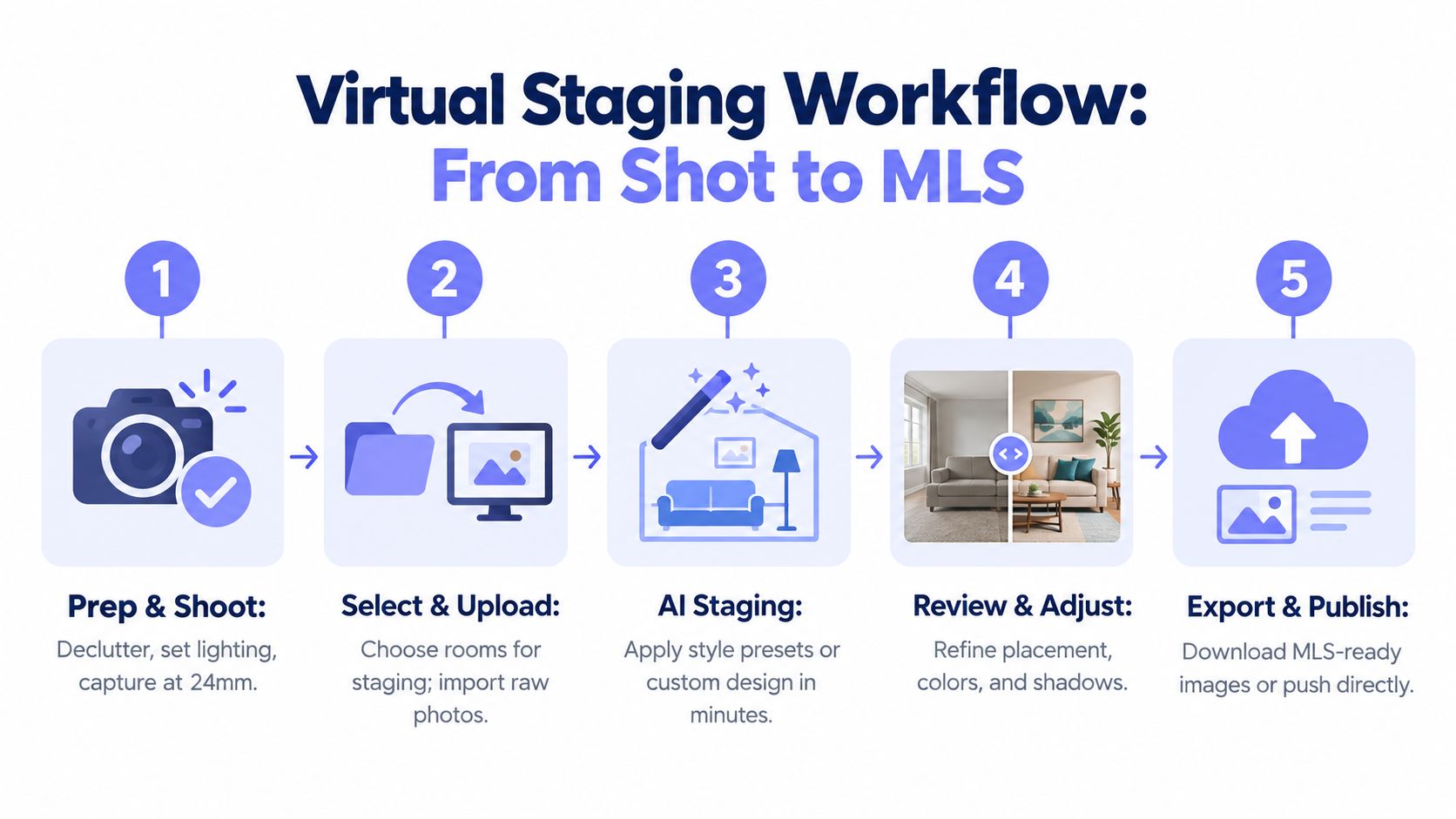
Same-afternoon workflow that holds up
Use AI first for speed, then switch to human review only where the image has enough marketing value to justify the extra cost and turnaround.
-
Cull the shortlist. Pick the rooms that explain how the home lives. Usually that means the living room, primary bedroom, dining space, and one office or flex room. Skip utility rooms, minor secondary angles, and any frame that will not make the first photo set.
-
Separate hero rooms from support rooms. Hero rooms are the images that show up in the MLS carousel, ads, and social posts. Support rooms fill out the gallery. This split determines whether a room gets an AI-only pass or a human-edited pass.
-
Run AI staging on the support rooms first. Most AI tools return drafts in seconds or a few minutes. That speed is useful when you need broad coverage fast. Keep style presets tight. One modern-organic look for the whole home will usually perform better than mixing glam, farmhouse, and contemporary across the same listing.
-
Review the AI outputs at full size. Check furniture scale, window edges, shadows, mirror reflections, and walking paths. If a chair blocks a doorway or a sofa floats off the wall, re-run it once. If the second pass still looks wrong, stop there.
-
Escalate only the hero rooms if needed. Human-edited services cost more per image and take longer, but they are usually the better call for luxury finishes, glass-heavy rooms, fireplaces, or spaces where incorrect scale will stand out. On a normal listing, I would rather pay for one corrected living room than keep burning time on five AI retries.
-
Export, label, and archive both versions. Save the original image, the staged image, and your disclosure language in the same listing folder. If your MLS requires labeling, do it before upload, not after the listing is live.
For floor-plan-driven marketing packages, ISO Mapper use cases are relevant when the same property also needs visual layout assets alongside staged images. If you want the photo-side sequence documented step by step, this how-to guide for virtual staging is a practical reference.
Where agents lose time
The delay usually happens in review, not rendering.
AI tools are fast, but they still need a person who can reject a bad output quickly. Human-edited services are slower, but they reduce the number of judgment calls on the back end. That is the trade-off agents feel on deadline. One route saves minutes up front. The other saves revision time on the images that matter most.
A simple rule works well: use AI-only staging for standard rooms that need coverage, and use human editing for the one or two photos that carry the listing presentation. Keep a written disclosure process, confirm commercial usage rights on the plan you bought, and never upload a staged image you have not checked at full resolution.
QC checkpoint: Zoom in before approval. If the furniture scale, shadow direction, or architectural lines look off, pull the image and re-run or escalate it.
Which Tool Fits Which Agent or Broker
Different teams need different trade-offs. The mistake is using one standard for every listing, every agent, and every price point.
Tool Recommendations by Agent Profile
| Agent Profile | Recommended Approach | Monthly Volume | Expected Spend | Fallback Tool |
|---|---|---|---|---|
| Solo listing agent | Credit-pack AI tool for core rooms, human edit only for the hero image if needed | Light and irregular | Usually low and predictable | BoxBrownie |
| Team admin or marketing coordinator | Subscription AI plan with consistent style presets and batch workflow | Steady, higher volume | More efficient when usage is regular | Apply Design |
| Broker focused on compliance | Human-reviewed or hybrid workflow with documented rights and internal QA | Varies | Mid to premium | Virtual Staging Lab |
| Luxury listing agent | Human-edited primary rooms, selective AI for secondary spaces only | Lower volume, higher stakes | Premium per listing | BoxBrownie |
Four common fits
A solo agent usually benefits most from flexibility. Credit packs beat subscriptions when listing flow isn't steady. You want low commitment, fast output, and the option to escalate a room if the AI pass looks thin or awkward.
A team admin handling volume needs consistency more than experimentation. That's where monthly plans make sense. Standardize a few approved styles, keep exports consistent, and avoid letting each agent invent a different visual identity for similar listings.
A broker with compliance obligations usually cares less about the absolute lowest image cost and more about whether the process is defensible. Clear rights terms, archived originals, approval records, and standard disclosure language matter more than saving a few dollars on one room.
A luxury agent should be selective. Obvious AI furniture can cheapen a high-end listing. Use AI for secondary rooms if needed, but treat the main living spaces as brand assets. That's where premium human review still earns its keep.
Vizcraft offers room-photo virtual staging and restyling, monthly render plans and one-time credits, and 2 free credits with no card required. Its ISO Mapper turns floor plans uploaded as images into 3D isometric visualizations. It fits teams that need both room concepts and floor-plan presentation assets. Generation time varies, and every output needs review before use in a listing.
Frequently Asked Questions
Does MLS allow virtually staged photos?
Permission and disclosure requirements depend on your MLS, brokerage, and applicable local rules. For example, SmartMLS's virtual-staging policy explains its own labeling requirements; do not assume the same requirements apply everywhere.
Treat every virtually staged image as a compliance item, not just a marketing asset. Check your MLS photo rules, confirm your brokerage policy, keep the original unstaged file, and label the edited version if your board requires it. As noted earlier, requirements vary by market, so the safest same-day workflow is simple: archive the original, export the staged version, and upload both to your listing file.
How fast is virtual staging software for real estate?
Fast enough for same-afternoon publishing if you use an AI-first tool. Human-edited services usually take longer, but they can save a room that AI renders poorly.
In practice, the trade-off is speed versus correction rate. AI tools can render in seconds or minutes per image, which works well when a listing goes live the same day. Human-reviewed services tend to run slower, often hours to a day or more, but the furniture scale, shadows, and placement are usually more reliable on the first delivery.
Is virtual staging cheaper than physical staging?
It can cost less for listing photographs, but compare quotes for the same scope. Virtual staging does not furnish the home for an in-person showing.
Per-image virtual staging is usually a small line item compared with bringing in furniture, scheduling installers, and staging an entire home for showings. That is why agents use virtual staging on vacant condos, rental turns, and mid-price listings where physical staging would be hard to justify. The budgeting question is less "virtual or physical" and more "AI-only at a low per-image cost, or human-edited at a higher cost with fewer revisions."
Who owns the staged image and can I use it in ads or print?
Check two things before you publish anything. The staging provider's license and the photographer's usage agreement both matter.
Some platforms allow broad commercial use. Others limit usage by plan, channel, or account type. I do not assume MLS use automatically covers brochures, listing sites, social ads, or print mailers. Confirm those rights before the images leave your team folder, especially if the listing may be syndicated, boosted, or reused in recruiting and pitch decks.
What if the staged room looks fake to buyers?
Do not use it.
AI staging fails in predictable ways. Sofas float, rugs come in oversized, dining chairs block door swings, and window light does not match the added furniture. Human-edited services usually catch more of that before delivery, which is why many agents use AI for secondary bedrooms and office spaces, then pay for human review on the living room, kitchen-adjacent spaces, or the hero image that will carry the listing.
An accurate empty-room photo is a better choice than a staged image that misrepresents the property.
If you need both listing visuals and floor-plan presentation assets, Vizcraft combines virtual staging with tools like ISO Mapper for 3D isometric maps and room visualization. It is a practical option when you want staged photos and layout-based marketing assets from the same workflow.