Virtual Staging Benefits That Move Listings Faster
Discover the real virtual staging benefits for agents, designers, and builders — cost, speed, conversion lift, and scalable workflows explained
Virtually staged homes typically sell in roughly 24–31 days versus 52–90 days for vacant listings, with staging costs typically 70–97% below physical staging. The practical benefit is not prettier listing photography alone. It's a shorter launch cycle, lower production spend, and a clearer way for buyers to understand an empty room without asking your team to move a single chair.
The numbers need context. Results vary by market, property condition, image quality, pricing, and the accuracy of the staged layout. A furnished image can attract attention, but it can also create disappointment if the furniture scale is wrong or the listing fails to disclose that the room was digitally furnished. The best virtual staging benefits come from reducing uncertainty, not from making a property look more expensive than it is.
Table of Contents
- What Virtual Staging Actually Changes for a Listing
- The Six Core Virtual Staging Benefits in Practice
- Virtual Staging vs Physical Staging vs Outsourced Renders
- Virtual Staging Cost and ROI Breakdown
- Who Gains the Most by Use Case
- Recommended Workflow and Tools Including Vizcraft
- When Virtual Staging Loses Its Edge
- Summary and Frequently Asked Questions
What Virtual Staging Actually Changes for a Listing
The common assumption is that virtual staging is mainly a marketing upgrade. In practice, it changes the listing operation itself. Industry analyses have reported virtually staged listings at roughly 24–31 days on market, compared with about 52–90 days for vacant listings, while virtual staging costs can sit 70–97% below physical staging (IACrea's 2026 real-estate analysis, StageVirtually's 2025 data review, Stuccco's industry summary).
Vizcraft Virtual Staging costs $29 per listing for 8 staged JPEGs from empty for-sale listing photos of one property, with modern, warm, or coastal looks. This purchase is separate from monthly rendering plans and credit packs. Review each image against the original and apply the disclosure rules for your market.
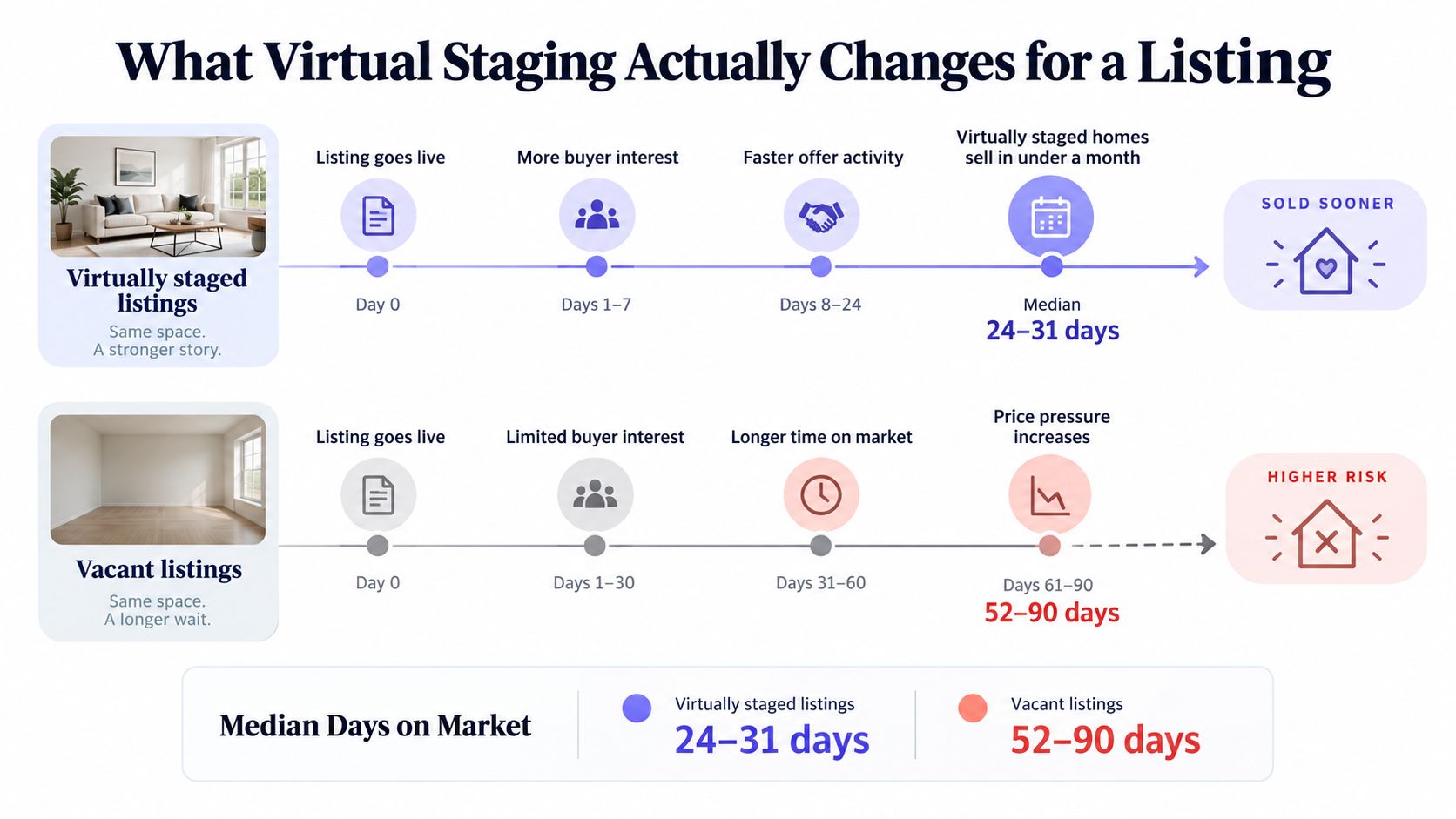
The operational shift
Physical staging introduces coordination. Someone has to source furniture, confirm access, install the pieces, photograph the property, remove the inventory, and process the invoices. A vacant property may remain unlisted while those steps are arranged, or it may launch with empty-room photos that leave buyers to infer scale and use.
Virtual staging compresses that chain. The practical sequence is straightforward:
- Photograph the room empty.
- Upload the source image.
- Choose a furnishing direction and room function.
- Review geometry, scale, windows, doors, and fixtures.
- Export the staged and unstaged versions for listing use.
That workflow supports the six benefits that matter operationally: lower cost, faster production, stronger listing engagement, portfolio scalability, visual consistency, and easier integration with existing marketing work. It also creates a responsibility that physical staging can sometimes obscure. The digital image must remain faithful to the actual room.
Agents comparing visual results should focus on the room's unchanged facts, not just the design appeal. A useful reference point is this collection of before-and-after staging examples, but every finished image still needs a floor-plan and disclosure check before publication.
The Six Core Virtual Staging Benefits in Practice
The six main virtual staging benefits show up in different parts of the business. Cost affects listing margin. Speed affects launch timing. Conversion affects portal performance. Scalability affects how many properties a small team can support.
| Benefit | Virtual Staging | Physical Baseline | Delta |
|---|---|---|---|
| Cost | Typically $16–$60 per room | Typically $2,000–$5,000 per home | 70–97% lower |
| Speed | Usually under 24 hours, with AI outputs in seconds to minutes | Often 5–14 days | Faster launch cycle |
| Conversion | Staged listings can receive stronger portal engagement and shorter market exposure | Vacant listings often provide less visual context | More opportunities for attention |
| Scalability | Multiple rooms and styles without inventory | Limited by furniture, movers, and storage | Higher listing capacity |
| Consistency | Repeatable styles, camera logic, and room treatment | Dependent on available inventory and crew execution | More consistent portfolio presentation |
| Workflow integration | Digital files can feed MLS, social, email, and sales materials | Requires coordination across photography and staging vendors | Fewer handoffs |
Cost and speed
Traditional staging can consume a meaningful portion of a listing budget. Virtual staging replaces furniture transport and rental coordination with a per-room production cost, often in the $16–$60 range, while industry summaries report reductions of up to 97% compared with physical staging (Stuccco's virtual staging statistics).
Speed matters because listing momentum starts before the first showing. AI staging can produce an image in seconds or minutes, while manual virtual staging commonly takes 24–72 hours (Roomagen's 2026 data summary). Physical staging can take considerably longer because the room has to be prepared in the property itself.
Conversion and scale
Staged images give portal visitors a usable visual reference. One industry summary cites 90% higher click-through rates and 70% more time on listing pages for staged listings, although those figures should be treated as directional rather than guaranteed outcomes for every property (Stuccco's summarized industry data).
The scale advantage is less glamorous but often more useful. An operations coordinator can produce several furnishing directions for a portfolio without maintaining a warehouse, scheduling movers, or repeating installation cycles. The same room can be shown as a living room, office, or bedroom when the floor plan supports those uses, giving the marketing team more options without another property visit.
Practical rule: Use virtual staging to clarify a room's likely use, not to create uses the floor plan cannot support.
Consistency and integration complete the workflow. A builder can apply a coherent furnishing language across multiple units, while an agent can reuse approved images in portal listings, social crops, email campaigns, and short-form video. The benefit isn't just visual polish. It's fewer handoffs and fewer opportunities for inconsistent representation. For a deeper operational breakdown, see this guide to AI virtual staging workflows.
Virtual Staging vs Physical Staging vs Outsourced Renders
The right method depends on the listing, not on loyalty to a particular production model. AI virtual staging is usually the fastest and least expensive option for ordinary vacant-room photography. Manual outsourced renders can be better when the image is difficult, the geometry is unusual, or a luxury listing requires extensive art direction.
| Method | Cost per Room | Turnaround | Revisions | Rooms per Month |
|---|---|---|---|---|
| AI virtual staging | $16–$60 | Under 24 hours | Usually quick digital iterations | High, limited mainly by review capacity |
| Manual outsourced virtual staging | $35–$120 | 24–72 hours | Commonly 2–5 rounds | Moderate, dependent on vendor capacity |
| Physical staging | $2,000–$5,000 per home | 5–14 days for setup | Physical changes require another visit | Limited by inventory, crews, and storage |
Where virtual staging wins
AI staging makes sense when the source photo is clear, the room geometry is conventional, and the team needs a fast listing launch. It also works well when the agent wants several style options or needs to stage multiple properties at once. There's no furniture delivery, de-staging appointment, or on-site storage requirement.
The low marginal cost makes experimentation practical. A team can test a warm contemporary look against a restrained modern look, then select the image that best fits the property and target audience. That doesn't mean the team should publish every variation. It means the production process gives the team more control before the listing goes live.
Where the alternatives still win
Manual outsourced renders remain valuable for high-end listings where material accuracy, reflection control, and exact furniture placement matter more than speed. They're also safer when the original photograph is low-resolution or the room contains complex architectural features that an automated workflow may distort.
Physical staging still has a role in occupied homes, model homes, and properties where buyers will judge the furnished experience during an in-person walkthrough. Physical furniture communicates real scale and condition directly. It can also help a sales center create a tactile experience that a listing image can't provide.
A practical decision rule is to treat $700 in listing price as a threshold for further evaluation. Below that point, virtual staging is usually the default because physical logistics can overwhelm the available margin. Above it, compare the property's buyer profile, image quality, geometry, and expected scrutiny. Teams working with more complex design imagery can also review AI rendering for architects before deciding whether an automated or manually directed workflow fits the assignment.
Virtual Staging Cost and ROI Breakdown
Per-image pricing hides the decision. The useful question is how much the staging workflow costs across a listing pipeline, and how quickly that expense becomes immaterial when it helps a property launch sooner or attract more qualified attention.
| Method | Living Room | Primary Bedroom | Dining Room | Avg Turnaround |
|---|---|---|---|---|
| AI virtual staging | $0.10–$2 per render | $0.10–$2 per render | $0.10–$2 per render | Seconds to minutes |
| Manual outsourced virtual staging | $15–$60 per image | $15–$60 per image | $15–$60 per image | 24–72 hours |
| Physical staging | $300–$600 per room per month | $300–$600 per room per month | $300–$600 per room per month | 5–14 days, plus setup |
| Physical setup | $1,000–$5,000 | $1,000–$5,000 | $1,000–$5,000 | Added before rental period |
These are working bands, not quotes. Furniture style, image complexity, revision requirements, local labor, and property size can move the final figure. A broader 3D rendering price list helps separate image production cost from the cost of a full staging engagement.
A simple 12-listing model
Assume 12 listings, three staged rooms per listing, and an AI staging cost of $1–$2 per render. The staging spend would be $36–$72 if each room receives one render. If the workflow produces multiple versions and the total reaches $54–$216, that remains a small production expense compared with the revenue at stake.
For the scenario requested by the brokerage, assume a 25% faster sale, a $400,000 median price, and a 2% commission. The commission on one sale is $8,000, and across 12 listings the gross commission pool is $96,000. A 25% reduction in the time required to close doesn't automatically create a 25% increase in annual commission, because the result depends on inventory, contracts, financing, and capacity. However, if the faster cycle lets the brokerage reclaim three equivalent listings from delayed turnover, the associated commission value is approximately $24,000.
The break-even point is therefore low. The staging cost is recovered as soon as it helps produce a fraction of one additional commissionable closing, or frees enough staff time to prevent one delayed launch. To calculate your own cost per day saved, divide total staging spend by the number of market days removed across the listings. Keep that calculation separate from commission attribution, because faster exposure and faster closing aren't identical outcomes.
Who Gains the Most by Use Case
The same technology produces different operational value for different teams. A solo agent cares about protecting commission and avoiding another vendor. A design studio cares about throughput and revision control. A developer cares about repeating design intent across inventory.
The single-agent brokerage
Consider a representative agent closing 12 listings a year. If the agent stages several rooms per property at roughly $1–$2 per render, the annual image-production cost stays modest even when every listing receives multiple furnished views. The agent can prepare vacant-room images without hiring a physical stager, and a faster review cycle can help recover roughly 10 days per listing when the market and property are a good fit.
At a $400,000 price and 2% commission, the gross commission per closing is $8,000. Across 12 closings, that's $96,000 before expenses and splits. The number that changes for this persona is the 10-day listing cycle recovery, not a guaranteed sales premium.
The boutique design studio
A studio running 40 listings a month faces a different constraint. If it previously paid $35 per outsourced render, then three staged rooms for every listing would cost $4,200 per month. An AI workflow can bring that monthly staging spend to under $300 under the supplied operating assumption, while keeping revisions free and unlimited within the chosen workflow.
The studio's key number is the monthly production cost, moving from approximately $4,200 to under $300. That difference can fund image review, client communication, or higher-quality photography instead of disappearing into repeated render orders.
The mid-size developer
A developer selling 80 spec units per quarter needs consistency more than novelty. AI staging lets the marketing team preserve a defined furnishing language across model homes and sales materials without storing physical furniture or rebuilding a room for every buyer segment. The team can adapt styles digitally while keeping the underlying room structure recognizable.
The changing number here is 80 units per quarter supported by one repeatable visual system. That doesn't replace model-home walkthroughs. It gives the sales team more controlled options before a buyer visits.
Recommended Workflow and Tools Including Vizcraft
A reliable workflow starts with the source photo, not the staging prompt. Capture the room in natural light, keep vertical lines straight, and use a 24mm-equivalent lens when the room requires a wider view without exaggerating its proportions. A clean, lightly edited image gives the renderer fewer problems to solve.
A five-step production loop
- Capture and prepare. Photograph the unfurnished room with doors, windows, built-ins, and fixtures visible. Don't crop out the details that establish scale.
- Upload the source. Use a RAW-derived or lightly edited image rather than an aggressively sharpened file. Preserve the original in the project folder.
- Set the design direction. Choose a style preset, room function, furniture scale, and color restraint. The style should support the property's price position and architecture.
- Review against the plan. Check furniture clearance, wall locations, window placement, ceiling height cues, and fixture positions. For plan-based context, ISO Mapper can help teams turn floor plans into visual references before they approve a staged layout.
- Export both views. Save an MLS-compliant JPEG, a furnished version, and an unfurnished pair. Add the virtual-staging disclosure to the listing copy and image workflow.
The review step is where most quality differences appear. A render can look attractive at thumbnail size while placing a sofa across a doorway or making a narrow room appear deep enough for furniture that cannot physically fit.
Platform comparison
InteriorAI, RoomGPT, ArchiVinci, mnml.ai, Decor8, ReimagineHome, Collov, and PromeAI are alternatives in this category, not Vizcraft features. Compare them on the points that affect daily operations: whether pricing is subscription or credit-based, whether the render preserves geometry, how revisions are handled, and whether the vendor gives your team a clear disclosure workflow.
Vizcraft Virtual Staging costs $29 per listing for 8 staged JPEGs from empty for-sale listing photos of one property, with modern, warm, or coastal looks. This purchase is separate from monthly rendering plans and credit packs. Review each image against the original and apply the disclosure rules for your market.
When Virtual Staging Loses Its Edge
Virtual staging stops helping when the image creates a promise the property can't keep. Buyers' agents primarily associate staging with helping buyers visualize the property as a future home, with 83% agreeing on that point. At the same time, 29% of sellers' agents reported a 1% to 10% offer lift in 2025 when staging was used (Florida Realtors' summary). Those figures support staging as a visualization tool, not as permission to disguise limitations.
Disclosure is the first control. Check the MLS rules and local advertising requirements for the market, label virtually staged images clearly, and keep the unfurnished image available when the platform and listing format allow it. A buyer should know whether the furniture exists in the property before scheduling a showing.
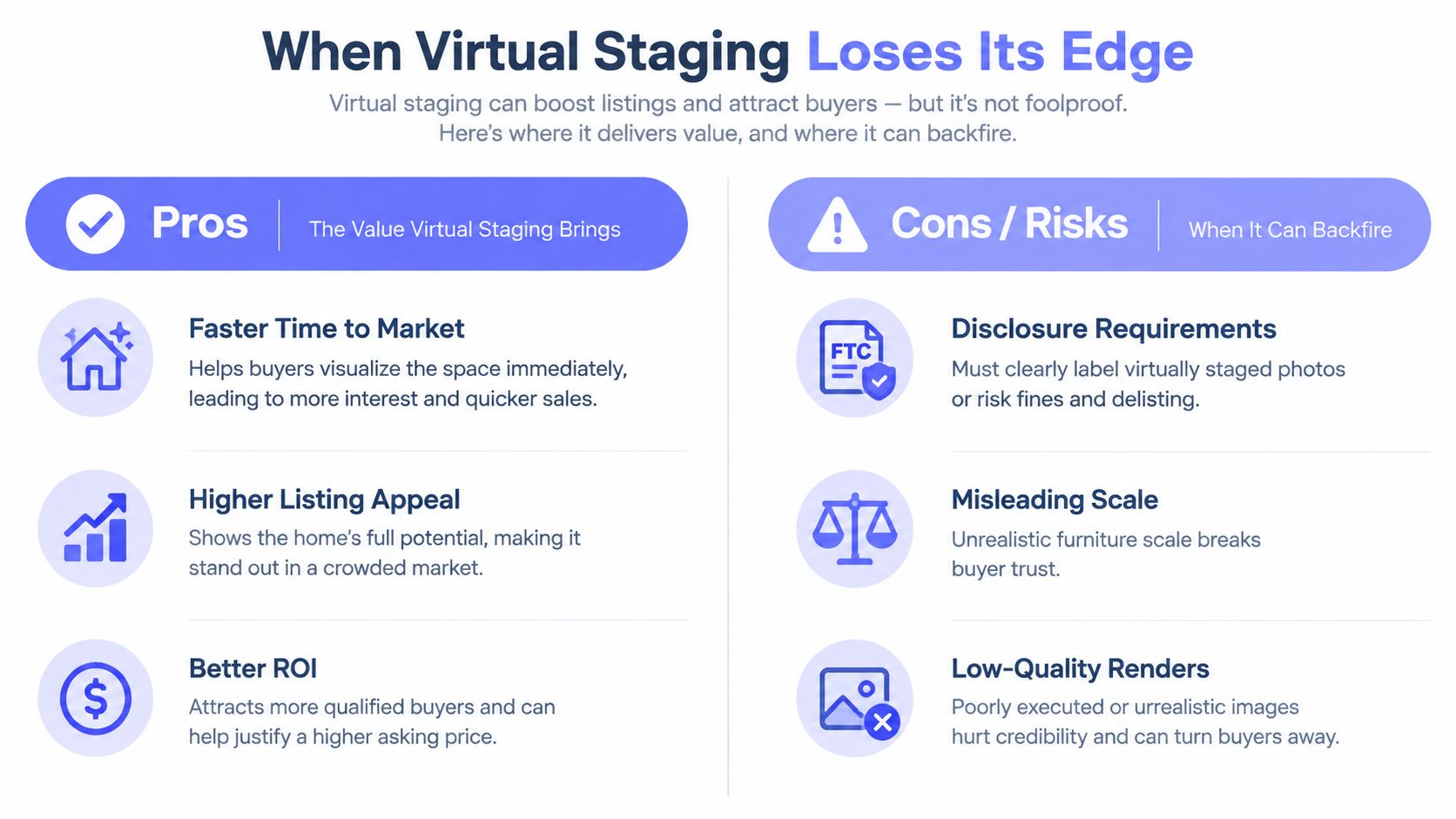
The trust checks that matter
Run three checks before publication:
- Verify scale. Compare furniture dimensions with room measurements, clearances, doors, and circulation paths.
- Protect geometry. Confirm that the render hasn't moved windows, changed wall depth, enlarged the room, or removed a structural obstruction.
- Control aspiration. Avoid saturated colors, oversized furniture, or luxury styling that conflicts with the property's actual condition and price position.
The buyer's first walkthrough is the test. If the staged image shows a generous seating area but the physical room cannot accommodate it, the buyer may interpret the image as misleading even when the disclosure is present. Low-quality renders create a similar credibility problem because warped legs, inconsistent shadows, and incorrect reflections make the entire listing look careless.
Virtual staging is a presentation layer. It doesn't replace accurate photography, accurate pricing, property disclosures, or a floor-plan review. Used carefully, it reduces the cognitive effort required to understand an empty room. Used carelessly, it increases the gap between the portal experience and the property itself.
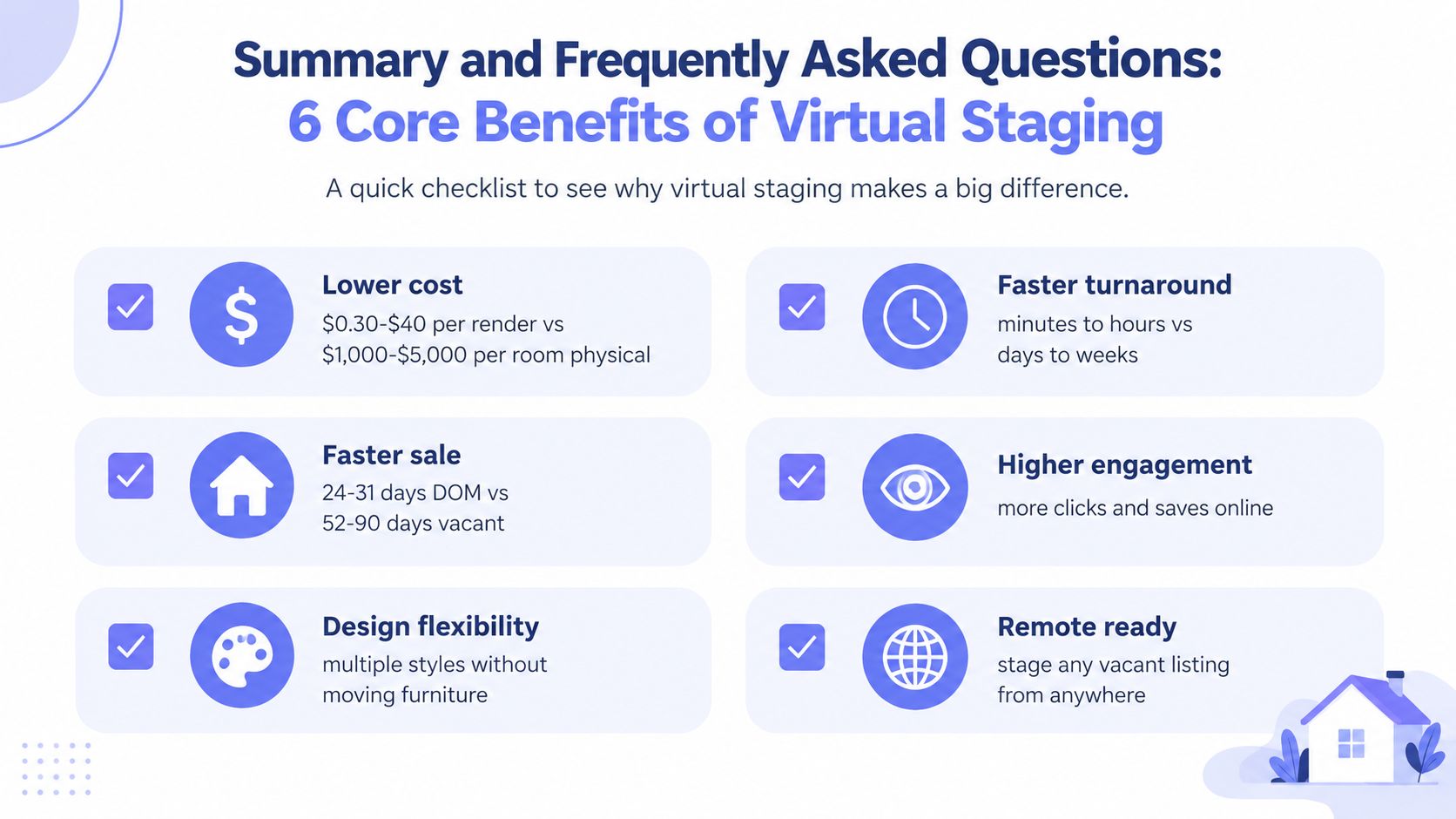
Summary
The practical checklist is short:
- Lower cost: Virtual staging ranges from low per-render production costs to room-based pricing, while physical staging carries setup and rental expenses.
- Faster turnaround: AI outputs arrive in seconds to minutes, rather than waiting for physical installation or manual production.
- Faster market exposure: Industry summaries place virtually staged listings around 24–31 days on market versus 52–90 days for vacant listings (IACrea's 2026 analysis).
- Higher engagement potential: Staged imagery can improve listing comprehension and portal interaction when the image remains accurate.
- Design flexibility: Teams can test several furnishing directions without moving furniture.
- Remote readiness: An empty listing can be staged from anywhere with a suitable source photo.
Frequently Asked Questions
What does virtual staging cost per photo?
It depends on the tool and workflow. AI production can range from cents to a few dollars per render, while manual outsourced work typically costs more per image. Physical staging is priced around the property and room, not just the photo.
Do buyers accept digitally staged rooms?
They can, provided the image is disclosed and the actual property remains accurately represented. Include unfurnished views where practical, especially for rooms where scale or condition could be misunderstood.
How do disclosure rules differ by market?
MLS policies and advertising rules vary. Check the local MLS requirements, label the image clearly, and keep the disclosure close enough to the image or listing description that buyers won't miss it.
Does virtual staging work only on empty rooms?
No. It can also replace existing furniture, change a room's style, or show a plausible alternative use. The result still has to respect the actual layout and construction.
How should a team choose a vendor?
Test source-photo handling, geometry preservation, revision speed, export quality, pricing transparency, and disclosure support. Compare the finished output on real listing images, not only on sample galleries.
How does AI staging compare with manual virtual staging?
AI is usually faster and cheaper. Manual staging can be preferable for unusual geometry, complex lighting, low-resolution source images, or luxury work where detailed art direction justifies the added cost.
Vizcraft Virtual Staging costs $29 per listing for 8 staged JPEGs from empty for-sale listing photos of one property, with modern, warm, or coastal looks. This purchase is separate from monthly rendering plans and credit packs. Review each image against the original and apply the disclosure rules for your market.