Is Virtual Staging Worth It Costs ROI and When to Use It
Is virtual staging worth it? Compare costs, ROI, time on market and when virtual beats physical staging, with practical decision criteria for agents.
You've photographed an empty listing, the images look clean, and the seller asks the question that usually decides the marketing plan: is virtual staging worth it, or should you pay for furniture, delivery, setup, rental, and removal? The answer depends on which job you need staging to perform.
Virtual staging can reduce presentation costs and produce listing images quickly. It can also improve the top of the digital funnel by helping buyers understand room scale, function, and circulation. But a higher click-through rate isn't the same as a stronger offer after an in-person tour. If the images create expectations the property can't meet, the cost saving may come with a trust penalty.
The practical decision is therefore not “virtual staging or no staging.” It's whether you need low-cost digital presentation, physical emotional impact, or a hybrid of both. The comparison below uses typical published ranges, separates online engagement from tour-stage conversion, and gives agents a cost-per-image decision framework for standard, premium, vacant, occupied, and portfolio-scale listings.
Table of Contents
- Introduction Is Virtual Staging Worth It for Your Listing
- What Virtual Staging Actually Does and How It Works
- Virtual Staging vs Physical Staging Cost and Speed Compared
- What the Evidence Says About Time on Market and Buyer Response
- When Virtual Staging Is Worth It and When It Is Not
- Limitations Disclosure and Trust Risks to Manage
- How to Decide and FAQ on Virtual Staging Value
Introduction Is Virtual Staging Worth It for Your Listing
An empty room creates a specific marketing problem. Buyers can see walls, windows, flooring, and openings, but many still struggle to understand whether a sofa will fit, where a dining table belongs, or how the room connects to the rest of the home. That uncertainty can make a perfectly usable space look smaller or less purposeful online.
Physical staging solves that problem with real furniture. It also brings logistics, scheduling, storage, labor, and a listing-level bill that often reaches thousands of dollars. Virtual staging solves the photo problem instead. A digitally furnished image can show a plausible use for the room without sending a truck to the property.
The economics are straightforward, but the performance question has three separate parts:
- Cost control: Can you improve the listing presentation without absorbing the expense of physical furniture and logistics?
- Funnel performance: Will better images generate more clicks, longer listing-page visits, and more showing interest?
- Tour conversion: Will buyers feel that the home they visit matches the home they saw online?
Those outcomes shouldn't be treated as interchangeable. A virtually staged image may earn attention while still requiring careful disclosure and realistic furniture scale. Conversely, physical staging may create a stronger in-person impression but make less sense for a property that needs fast, repeatable marketing production across many listings.
The decision becomes clearer when you compare the typical cost structures first, then review the evidence on buyer response, then match the approach to the property and audience. Agents should also consider the actual production workflow, including how quickly they can create revisions, how many images they need, and whether a floor-plan-led visual is more useful than a photo restyle.
What Virtual Staging Actually Does and How It Works
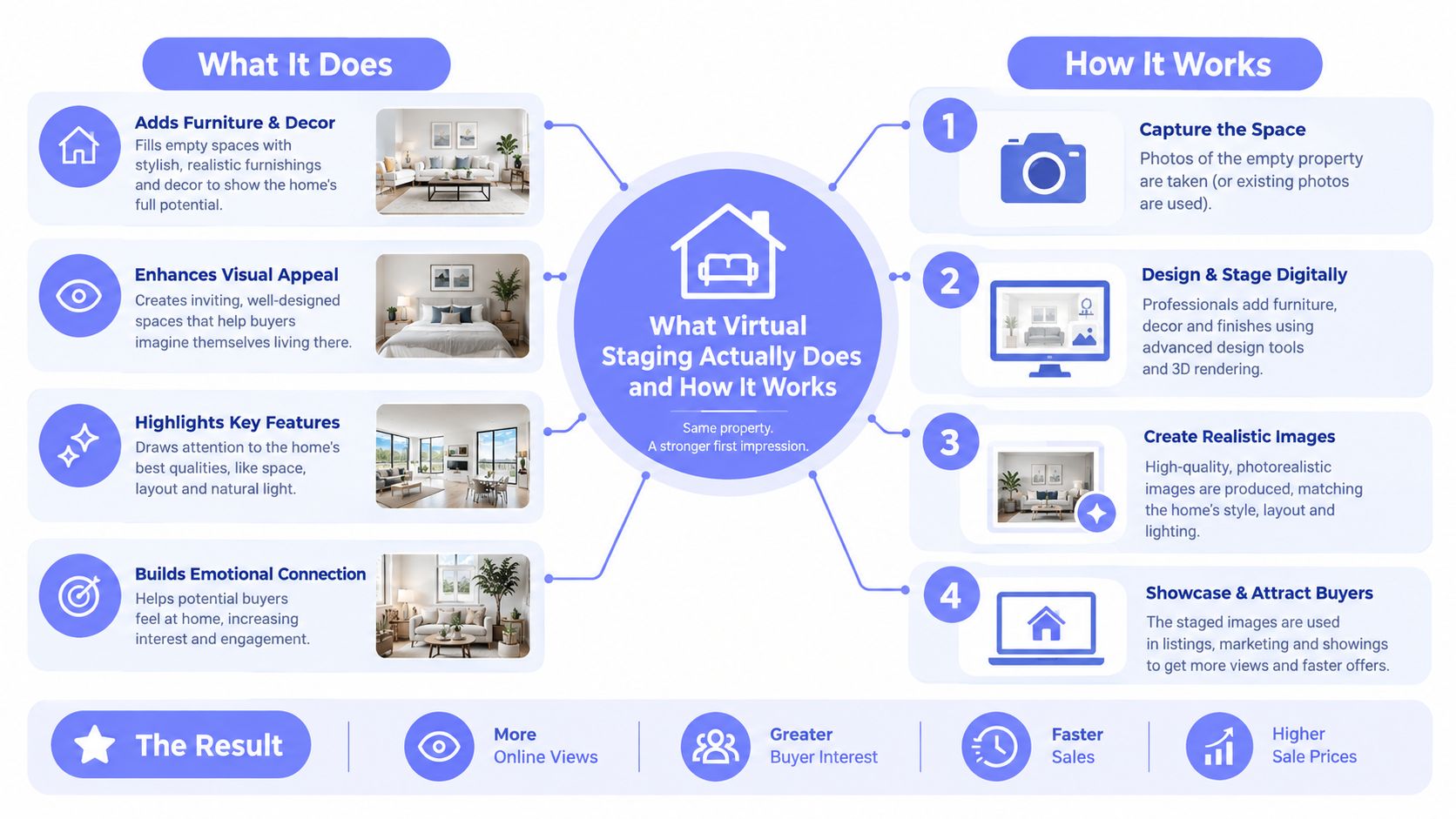
Virtual staging starts with an existing property image. The service adds digital furniture, lighting treatment, rugs, artwork, and décor while aiming to preserve the room's walls, openings, proportions, and major fixtures. The result is a marketing visualization, not a construction document or editable BIM model.
The simplest analogy is a furniture overlay. Instead of moving a sofa through a doorway, a team uses software to place a visually appropriate sofa into the photograph. The room remains physically empty, but the listing image communicates how the space could function.
A workable process usually looks like this:
- Prepare the image. Use a clear room photograph with visible walls, windows, doors, and floor area.
- Upload the file. Common supported inputs include JPG, PNG, HEIC, and WebP.
- Choose the intended use. A living room may need a conversational layout, while a spare room might be shown as an office or bedroom.
- Generate or commission the edit. AI tools produce a result quickly. Human-edited services involve an editor selecting and refining the furniture and composition.
- Review for accuracy. Check that furniture scale, access paths, doors, windows, and built-ins still make sense.
- Label the image appropriately. A digitally staged photo should be distinguishable from a photograph of the existing condition.
AI and human-edited services differ most sharply in workflow speed. One 2026 pricing guide lists AI subscription tools at about 10 to 30 seconds per image, while human-edited services usually take 24 to 48 hours (stagehq.ai's virtual staging cost guide). That gap affects more than initial delivery. It changes how easily an agent can test a style, correct an awkward layout, or respond to a seller revision before launch.
What the output can and cannot tell buyers
A staged image can clarify scale, circulation, and room function. It can't prove that the furniture exists, that a particular finish is present, or that the room feels identical in person. The image is persuasive because it reduces interpretation work, but that persuasion has to stay within the property's real geometry.
For agents who need a deeper workflow explanation, this guide to AI virtual staging is relevant to the distinction between photo-based generation and more manual editing. The important operational point is simple: virtual staging produces client-ready marketing imagery, while floor plans, surveys, and construction models remain separate source materials.
Virtual Staging vs Physical Staging Cost and Speed Compared
The cost decision favors virtual staging for many standard listings because the billing unit is usually an image or room, not an entire property plus furniture logistics. Independent pricing summaries place virtual staging at roughly $5 to $25 per image, while traditional physical staging commonly costs about $1,500 to $3,000 or more per listing, implying roughly 95% to 99% lower cost for virtual presentation in the cited comparisons (Saleswise's virtual staging analysis).
| Option | Typical Cost | Turnaround | Best For |
|---|---|---|---|
| AI virtual staging | About $2 to $5 per room in some market summaries | Seconds to minutes | Vacant rooms, rapid listing preparation, repeated revisions |
| Standard virtual staging service | About $5 to $25 per image | Same day to 24 to 48 hours, depending on provider | Agents who want edited listing images without physical logistics |
| Human-edited or premium virtual staging | Commonly $24 to $150 per room | Often 24 to 48 hours or longer | High-touch creative direction and custom presentation |
| Physical staging | Often $1,500 to $3,000 or more per listing | Setup requires scheduling, delivery, and labor | Listings where in-person atmosphere and tactile presentation matter |
Published 2026 pricing guides also show AI subscription tools around $16 to $79 per month, with full-quota pricing of roughly $0.24 to $2.67 per image, while one-time models often sit in the low single digits per image and human-edited tiers commonly range from $24 to $150 per room (Refresh Deco AI's pricing summary). These figures describe different delivery models, so agents should compare the actual quota, revision rules, commercial rights, and usable output quality rather than selecting the lowest headline price.
Vizcraft Virtual Staging costs $29 per listing for 8 staged JPEGs from empty for-sale listing photos of one property, with modern, warm, or coastal looks. This purchase is separate from monthly rendering plans and credit packs. Review each image against the original and apply the disclosure rules for your market.
Why turnaround changes the operating model
Physical staging requires access coordination, inventory availability, delivery, installation, removal, and sometimes rental extensions. Human-edited virtual staging removes much of that logistics burden but still introduces a queue. AI staging is useful when the listing timeline changes late in the day, a seller requests a different style, or a brokerage needs multiple variants for review.
The practical comparison is marginal cost. Once a physical staging appointment is booked, changing the furniture layout can involve another coordination cycle. With image-based generation, an agent can test a different furnishing direction without rebooking a truck or waiting for a room to be reset. That doesn't make AI staging automatically better. It makes it more adaptable for high-volume, deadline-driven operations.
What the Evidence Says About Time on Market and Buyer Response
Cost only answers whether virtual staging is affordable. The harder question is whether the presentation changes buyer behavior enough to justify the effort.
A 2025 National Association of Realtors survey, cited in industry summaries, found that 83% of buyers' agents said staging helps buyers visualize a home, while 49% of sellers' agents said staging reduced time on market (Roomagen's summary of virtual staging statistics). Separate industry reporting citing RESA data reported staged homes selling in about 24 days, compared with 90 days for unstaged homes, a 73% reduction in days on market, though those figures describe staged versus unstaged homes and shouldn't be treated as proof that every virtually staged listing will produce the same result.
The causal mechanism is plausible. Empty rooms ask buyers to perform mental work. They have to infer dimensions, imagine furniture placement, and decide whether the available floor area supports the room's advertised function. Staging supplies an immediate visual answer.
Independent market summaries also report that virtually staged listings show roughly 3.5% to 4.5% thumbnail click-through rates, compared with 1.8% to 2.2% for empty rooms, described as about a 90% lift. The same reporting places listing-page time at roughly 27 seconds for empty rooms versus 45 to 60 seconds for staged images (Stage Virtually's virtual staging ROI summary).
The operational takeaway: Virtual staging can improve the listing funnel by making the room easier to understand, but funnel engagement isn't the same as a completed sale.
Separate the click from the showing
A buyer who clicks an image has shown curiosity. A buyer who schedules a showing has accepted a higher level of commitment. A buyer who makes an offer has evaluated condition, location, layout, price, and trust.
Virtual staging's strongest measurable role is often near the first step. It helps the listing earn attention and gives viewers a faster mental model of the room. The agent still needs accurate dimensions, complete property photography, and honest presentation to carry that interest into a tour.
That's why before-and-after comparisons should be reviewed for geometry and expectation management, not just visual polish. The before-and-after staging examples workflow can help teams judge whether an edit clarifies a room or makes it look more expensive than the underlying space supports.
When Virtual Staging Is Worth It and When It Is Not
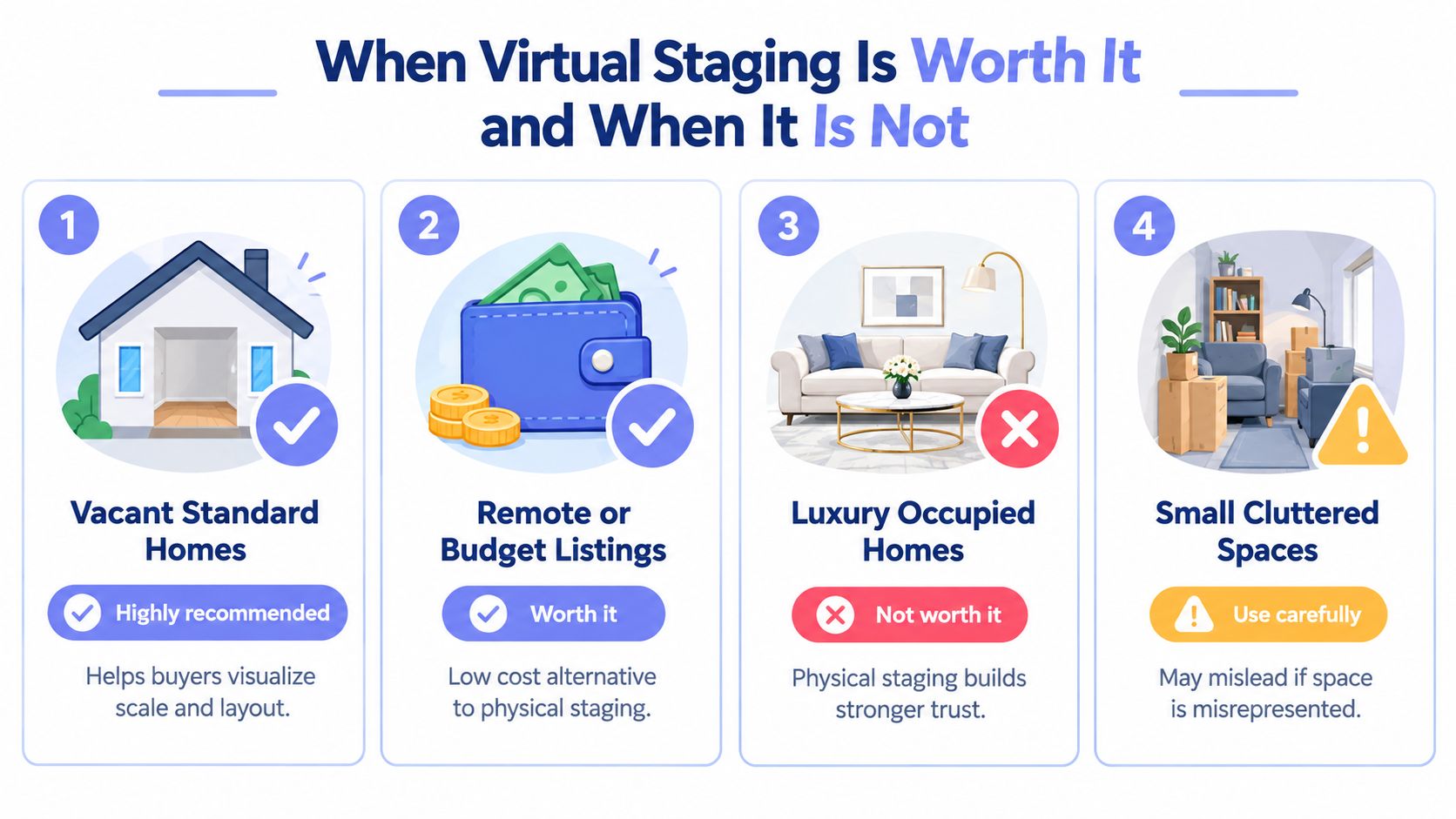
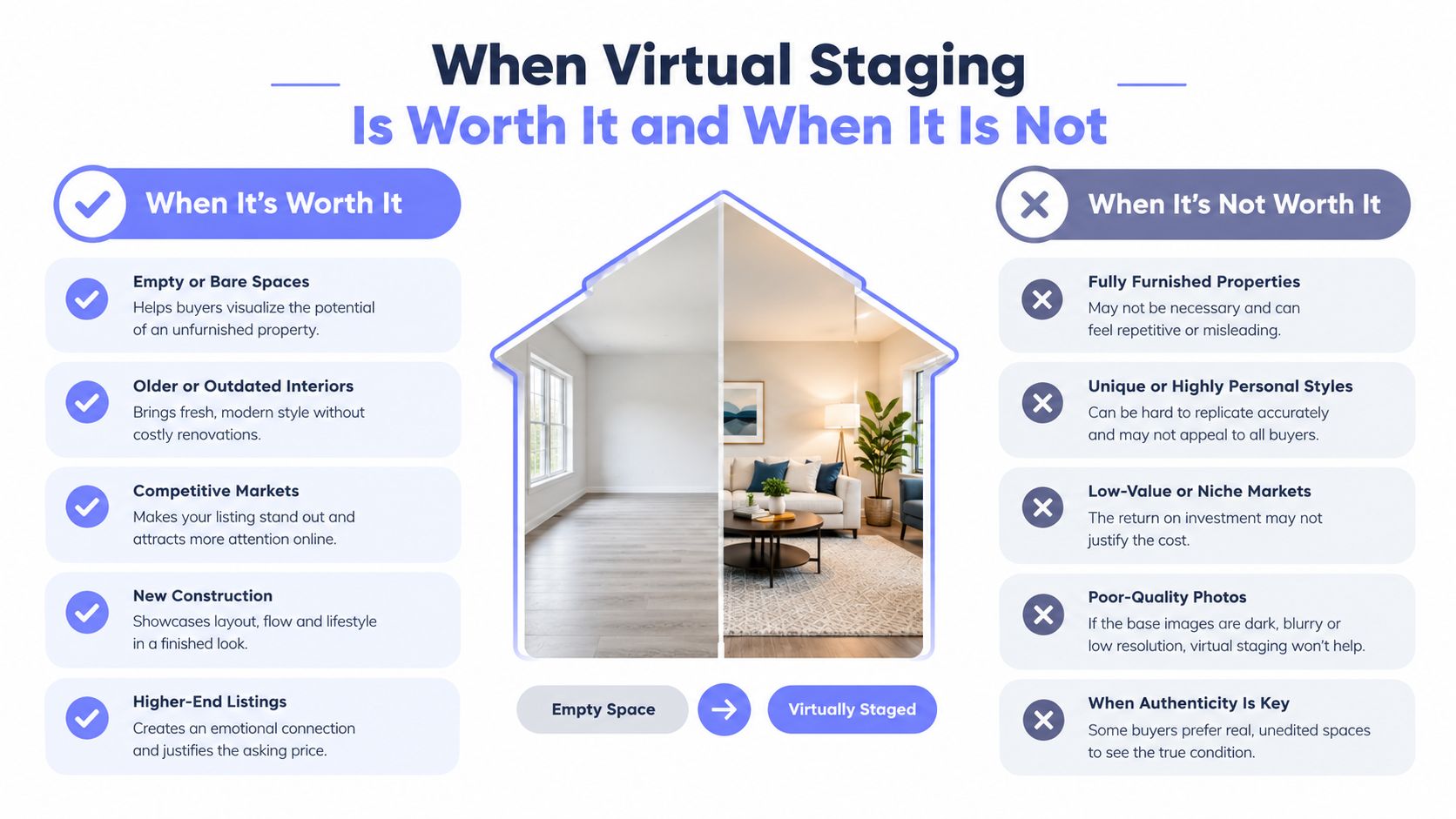
The best fit is a vacant, conventional home where buyers need help understanding scale and purpose. A digitally furnished living room can answer the basic question, “How would this room work?” without forcing the seller to pay for furniture that may remain in the property only briefly.
Virtual staging also fits remote or budget-constrained listings. If the property is far from the brokerage, has limited access windows, or doesn't justify a physical staging bill, image-based presentation can provide a practical middle path. Portfolio operators benefit for a different reason. They can apply a repeatable process across many listings without managing furniture inventory and installation schedules.
| Listing situation | Recommended approach | Reason |
|---|---|---|
| Vacant standard home | Virtual staging | Clarifies room function at low marginal cost |
| Remote listing or tight marketing budget | Virtual staging | Avoids furniture transport and setup logistics |
| Multiple listings managed by one team | AI-led virtual workflow | Supports repeatable production and rapid revisions |
| Luxury or emotionally sensitive property | Physical or hybrid staging | Builds stronger tactile confidence during tours |
| Historic home with distinctive details | Hybrid or physical staging | Protects authenticity and avoids generic décor |
| Small or awkward room | Use virtual staging carefully | Furniture can misrepresent usable space if scale is wrong |
Luxury listings deserve a separate judgment. Buyers may expect material quality, atmosphere, and a sense of arrival that a photograph alone can't provide. Historic properties can also suffer when generic contemporary furniture competes with architectural character. In those cases, physical staging may win even when its cost is higher because it supports the in-person story.
Vizcraft Virtual Staging costs $29 per listing for 8 staged JPEGs from empty for-sale listing photos of one property, with modern, warm, or coastal looks. This purchase is separate from monthly rendering plans and credit packs. Review each image against the original and apply the disclosure rules for your market.
A decision checklist for agents
Before approving the work, ask:
- What is the bottleneck? If buyers can't understand an empty room online, virtual staging addresses the problem. If the home feels cold during tours, physical preparation may matter more.
- How many images need treatment? A small image set may favor a one-time service. A recurring pipeline may favor subscription economics.
- Could the edit create a false expectation? Small rooms, unusual layouts, and premium finishes need careful review.
- Will the seller accept a hybrid plan? Keep key rooms physically prepared while using virtual staging for secondary spaces or alternate layouts.
- Can the team disclose the images clearly? If not, the workflow isn't ready for publication.
For broader property presentation workflows, the real estate use case is the relevant reference point. The decision isn't about using digital furniture everywhere. It's about applying it where visual comprehension has more value than physical atmosphere.
Limitations Disclosure and Trust Risks to Manage
A staged image can win the click and still weaken the showing if it makes the property look materially different from reality. The risk is highest when furniture changes perceived scale, when digital edits conceal permanent conditions, or when buyers assume that décor, finishes, and fixtures shown in the image are included.
Disclosure rules vary by MLS, brokerage, jurisdiction, and platform. Agents should check the applicable requirements before publishing, but a conservative operating practice is to label digitally staged images clearly and include at least some photographs that show the existing condition. That approach reduces ambiguity without giving up the visual benefit of a furnished concept.

Recent coverage identifies an ethics gray zone. 83% of buyers' agents say staging helps buyers visualize a future home, yet 60% say staging affects only some buyers and 26% say it affects most buyers (Roomstage's analysis of virtual staging value and ethics). The impact is real, but it isn't uniform, and the same image that helps one buyer may trigger skepticism in another.
Use safeguards that protect the tour-stage conversion:
- Label edited images: Make the digital treatment visible in the image caption or listing context where required.
- Show existing conditions: Pair staged images with unedited photos so buyers can distinguish possibility from current contents.
- Keep geometry fixed: Don't move walls, enlarge windows, erase columns, or alter permanent features.
- Use realistic scale: Furniture should leave credible circulation paths and shouldn't make a compact room appear oversized.
- Avoid feature substitution: Don't use décor to imply renovations, appliances, finishes, or amenities that aren't present.
- Review the sequence: Place an accurate room image near the staged version so the listing communicates both function and condition.
The how to do virtual staging workflow should therefore include a disclosure review, not just an image-generation step. For premium properties, authenticity may be worth more than the lowest production cost. A hybrid presentation can preserve the home's real atmosphere while using virtual images to explain flexible room uses.
Frequently Asked Questions
The cleanest decision rule is to identify the conversion point you're trying to improve. If the listing is vacant and the problem is weak online comprehension, virtual staging typically offers the strongest cost-to-output relationship. If the property depends on tactile finishes, historic character, or a high-touch emotional experience, physical staging or a hybrid plan may produce more reliable trust at the tour.
One market summary reports virtual staging at about $39 per room on average, while AI-powered staging can fall to roughly $2 to $5 per room, compared with physical staging that often runs thousands of dollars per listing (Morphed's virtual staging statistics summary). Treat those figures as planning ranges, not a promise of sale-price growth or a universal return.
Is virtual staging cheaper than traditional staging?
Typically, yes. Virtual staging is generally priced per image or room, while physical staging is commonly priced per listing and includes furniture, labor, delivery, setup, and removal. The right comparison is your required image count against the full physical staging commitment.
Does virtual staging help a home sell faster?
It can improve digital presentation and buyer visualization, but it doesn't guarantee a faster sale. Published industry summaries connect staging with buyer understanding and reduced time on market, while actual results also depend on price, condition, location, photography, and buyer demand.
Do virtually staged photos need disclosure?
Check your MLS, brokerage, and local requirements. As a risk-management practice, label digitally staged images, preserve the property's real geometry, and include unedited photographs that show the existing condition.
Does AI virtual staging look realistic?
Results vary by input photo, room complexity, furniture scale, and the tool used. Review every output for distorted architecture, impossible circulation, incorrect fixtures, and décor that implies something the property doesn't contain.
Vizcraft Virtual Staging costs $29 per listing for 8 staged JPEGs from empty for-sale listing photos of one property, with modern, warm, or coastal looks. This purchase is separate from monthly rendering plans and credit packs. Review each image against the original and apply the disclosure rules for your market.