3D Architectural Visualisation Software for 2026
Find the best 3D architectural visualisation software for your workflow in 2026. Compare top tools, key features, and pricing to make the right choice.
You're probably dealing with a familiar mess. The design model lives in Revit or SketchUp, the client wants a walkthrough tomorrow, marketing wants polished stills next week, and someone on the team is asking whether a fast cloud tool can replace the renderer you already own.
Usually, it can't. At least not completely.
That's why choosing 3D architectural visualisation software is less about finding one winner and more about assigning the right tool to the right decision stage. A live review tool solves a different problem than a final-frame renderer. A floor-plan-to-isometric tool solves a different problem again. If you rank everything by feature checklist, you miss the question: what are you trying to approve, and how expensive is each revision loop?
Early in the process, speed matters more than perfect light transport. In client review, stability and responsiveness matter more than shader depth. For marketing stills, quality usually beats convenience. And for repeatable plan visuals, cloud-native tools can remove a lot of setup work that a traditional renderer was never meant to handle.
The comparison below is the lens I use first.
| Workflow stage | Primary job | Best-fit software type | Typical trade-off |
|---|---|---|---|
| Concept | Test massing, layout, mood | Cloud-native AI tools, lightweight real-time tools | Fast output, less granular control |
| Schematic | Refine geometry, materials, view direction | BIM-linked real-time engines, native add-ons | Good feedback loop, not final-pixel |
| Client review | Walkthroughs, material swaps, approvals | Real-time engines | Stable interactivity matters more than maximum realism |
| Final frame | Marketing stills, award boards, hero views | Offline renderers | Slower turnaround, higher quality ceiling |
| Marketing support | Isometrics, floor-plan visuals, quick alternates | Cloud-native AI tools | Efficient volume output, narrower scene control |
Table of Contents
- Why Choosing 3D Architectural Visualisation Software Is Harder Than It Looks
- How the Architectural Visualisation Market Has Scaled
- The Four Families of 3D Architectural Visualisation Software
- Speed and Fidelity Compared Across Real-Time and Offline Tools
- Cost Comparison - Cloud vs Local Rendering Spend
- Picking the Right Tool by Project Stage
- A Recommended Hybrid Stack for Studios in 2026
- Frequently Asked Questions About 3D Architectural Visualisation Software
- How much does professional 3D architectural visualisation software usually cost per year?
- Do you need a powerful GPU for architectural visualization?
- Have real-time tools replaced offline renderers for final hero images?
- What does ISO Mapper do, and how is it different from a full renderer?
- Is there a low-risk way to test this kind of tool before paying?
Why Choosing 3D Architectural Visualisation Software Is Harder Than It Looks
The hard part isn't that there are too few options. It's that too many tools now overlap.
A real-time engine can export stills. An offline renderer can offer interactive previews. A cloud-native tool can generate presentation-ready images without a 3D scene. On paper, that sounds convenient. In practice, it makes procurement messy because teams start comparing products that solve different production problems.
The same project needs different kinds of speed
When a client asks for a camera shift, you need time to first useful pixel. When marketing asks for a brochure image, you need time to final frame. Those are not the same metric, and confusing them leads to bad software decisions.
A working studio also has to weigh hardware, seat count, revision rounds, and who will operate the tool. The renderer with the highest ceiling can still be the wrong choice if junior staff can't turn a revision around before the next meeting.
Practical rule: Choose software based on the cost of the next revision, not the beauty of the demo scene.
That's also why broad “best software” lists tend to be unhelpful. They flatten design review, client approvals, and marketing delivery into one buying decision. They shouldn't be.
Hidden costs show up faster than license costs
The visible price is usually the smallest line item. Spend sits in three places:
- GPU dependency: Real-time and offline tools often push you toward better local hardware or shared machines.
- Render capacity: Final stills and animation sequences can turn farm usage into a recurring cost.
- Rework time: A slow approval loop costs more than a cheap subscription saves.
Cloud-native tools change that equation for some outputs because they move the bottleneck away from local hardware. That matters most for teams generating plan-based visuals, staged options, or fast concept variants. If you want a deeper workflow breakdown, the AI architectural visualization guide is useful as a companion to this software comparison.
A better way to compare tools
I'd rank 3D architectural visualisation software through five stages: concept, schematic, client review, final frame, and marketing support. That framework exposes where each tool earns its keep.
Enscape isn't competing with V-Ray in the same moment of the job. ISO Mapper isn't trying to be Enscape. Twinmotion isn't built for the same output standards as a tuned offline scene. Once you separate the stages, the tool choices become much more obvious.
How the Architectural Visualisation Market Has Scaled
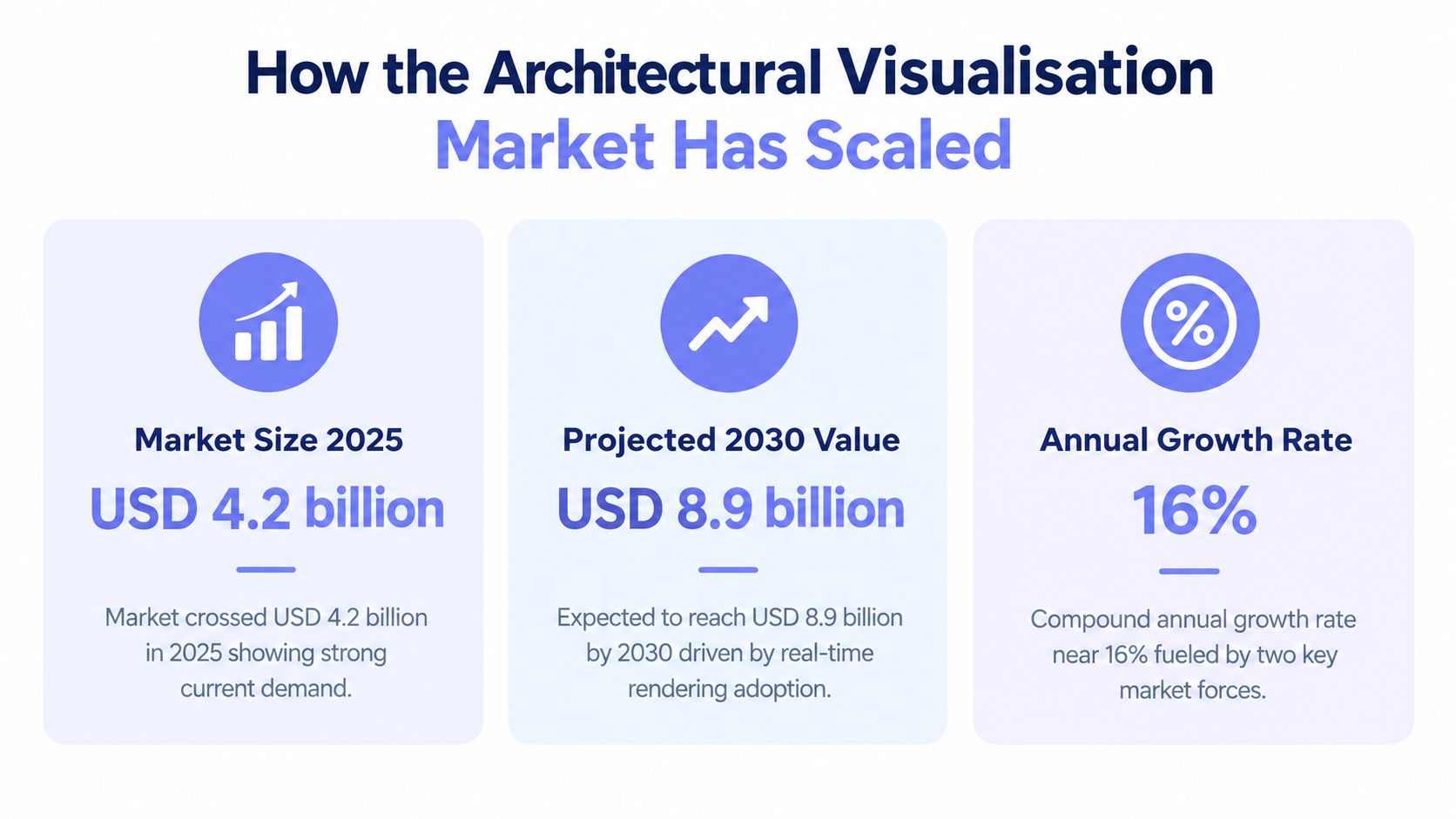
The category is no longer niche software for specialist rendering teams. One market estimate valued the broader visualization and 3D rendering software sector at USD 2.20 billion in 2022 and projected USD 17.38 billion by 2030, implying a 30.6% CAGR over 2023 to 2030 according to this market report on architectural visualization and rendering software.
That scale matters because architectural visualization software sits inside that larger category. Firms aren't treating visuals as end-of-project decoration anymore. They're using them earlier, more often, and in more formats.
Growth changed the buying pattern
What used to be a specialist stack for final renders is now a broader production layer. Teams need tools for:
- Internal design checks: quick visual validation before a meeting
- Client-facing review: visuals that support discussion, not just presentation
- Sales and marketing output: polished images before the building exists
- Plan-based communication: isometrics and cutaway visuals that non-technical viewers can read quickly
That expansion explains why software categories have split. One firm might need a BIM-linked review engine, a high-end offline renderer, and a separate cloud workflow for floor plans or interior alternates.
Market growth changed expectations inside studios
The historical progression helps explain the current tool offerings. Sketchpad appeared in 1963, DAC-1 in 1964, AutoCAD reached personal computers in 1983, 3D Studio DOS arrived in 1990, V-Ray launched in 1997, and Revit added BIM in 2000, according to this historical market overview. That timeline shows the shift from drafting, to modeling, to realism, to data-connected workflows.
The same source also notes that the CGarchitect rendering survey reported 2,526 responses in 2021, which is a useful signal that this is a mature professional field with stable community norms, not an experimental corner of design tech.
Studios now buy visualization software the way they buy core production software. It affects staffing, hardware, deliverables, and how quickly a design team can get to approval.
The Four Families of 3D Architectural Visualisation Software
Not all 3D architectural visualisation software belongs in the same comparison set. In practice, most tools fall into four families, and each one has a different cost shape, speed profile, and best-fit moment in the workflow.
Four Families of 3D Architectural Visualisation Software at a Glance
| Family | Example tool | Cost shape | Best-fit stage |
|---|---|---|---|
| Real-time engines | Enscape | Seat subscription plus GPU dependency | Client review, live walkthroughs |
| Offline renderers | V-Ray | Seat subscription or license plus render time overhead | Final frames, marketing stills |
| Native BIM add-ons | Revit-linked visualization tools | Added cost on top of host CAD/BIM stack | Schematic design, in-model iteration |
| Cloud-native AI tools | ISO Mapper | Credit-based or subscription usage | Floor plans, isometrics, quick visual options |
Real-time engines
Real-time tools earn their keep when people need to make decisions together. They reduce friction in meetings because you can move the camera, adjust materials, and answer basic spatial questions without sending a new render queue.
A recent industry comparison framed these tools around operational criteria such as time to first useful pixel, time to final frame, hardware cost, and OS compatibility. In that comparison, Enscape, Twinmotion, and D5 Render are rated “Instant” for interactive start speed and “Fast” for final render performance, while V-Ray is “Moderate/Very High” and Cycles is “Moderate/Moderate” in the same framework from Maxon's architectural rendering software comparison.
That distinction is more useful than feature-count arguments. It tells you what happens on an actual deadline.
Offline renderers
Offline tools still own the high end. If the image is going to a brochure, competition board, sales deck, or campaign page, control over lighting, materials, and render passes usually matters more than speed.
The trade-off is predictable. You'll wait longer, and the pipeline is less forgiving when the design is still moving. That's why offline rendering tends to work best after camera positions, materials, and scene intent are mostly locked.
Native BIM add-ons and cloud-native AI
Native BIM-linked visualization sits in the middle. It's useful when the model changes frequently and the team wants tighter continuity between design authoring and review output. The downside is ecosystem lock-in. Your rendering workflow starts to follow your host software's constraints.
Cloud-native AI tools solve a narrower but growing set of problems. They're good when the input is a floor plan, photo, or sketch and the output is a quick visual artifact for communication, not a custom-built hero scene. That makes them practical for diagrams, isometric maps, staged variations, and proposal support. The AI rendering for architects article is worth reading if your team is deciding where that kind of tool belongs in the pipeline.
Speed and Fidelity Compared Across Real-Time and Offline Tools
Speed only matters if it maps to the kind of decision you're making. A renderer that starts instantly but can't hold material credibility under close review creates one kind of problem. A renderer that looks excellent but takes too long to iterate creates another.
Speed and fidelity benchmarks by tool
| Tool | Real-time FPS (mid-range GPU) | Time to 4K still | Best fidelity ceiling |
|---|---|---|---|
| Enscape | Fast interactive preview | Fast final export | Good for review, lower than offline finals |
| Twinmotion | Fast interactive preview | Fast final export | Strong presentation quality |
| D5 Render | Around 30 FPS in typical complex scenes on RTX 3060-class GPUs | Fast compared with offline workflows | Strong for real-time presentation |
| V-Ray | Moderate interactive speed | Minutes to hours per frame | Very high |
| Cycles | Moderate interactive speed | Slower than real-time tools | Moderate to high depending on scene setup |
What real-time actually buys you
Independent coverage focused on architecture reports that D5 Render can reach around 30 FPS in typical complex scenes on RTX 3060-class GPUs while maintaining quality. The same coverage notes that real-time engines in this category commonly operate at 15 to 60+ FPS, while offline renderers may take minutes to hours per frame, according to D5 Render's real-time rendering tools overview.
That's the practical threshold for client review. At that level, navigation stays responsive enough that the meeting feels interactive rather than delayed by software.
If the client session depends on live navigation, responsiveness beats microscopic realism almost every time.
What offline quality still buys you
Offline rendering remains the quality ceiling because it handles difficult light behavior, reflective materials, and polished composition with more control. That matters most in interiors, glazing-heavy exteriors, and any shot where the final image will be scrutinized outside the design team.
The mistake I still see is using a final-frame tool too early. Teams spend hours polishing images before the design has survived a live review. That's backwards. The real-time vs offline CAD rendering comparison is a good reference if you're deciding where to place that handoff in your workflow.
Match the renderer to the approval moment
Use real-time when the purpose is movement, discussion, and change. Use offline when the purpose is commitment to a polished image.
That sounds obvious, but it's where most software overspend starts. Firms buy a top-end renderer, then force it into review work it was never meant to do. Or they overextend a real-time engine into marketing deliverables where its limitations become visible.
Cost Comparison - Cloud vs Local Rendering Spend
Cost discussions around 3D architectural visualisation software usually start with license prices and stop too early. That misses the actual spend drivers.
The bigger budget question is where your team carries the load: on local hardware, through real-time subscriptions, or through cloud processing and per-image generation. Each approach shifts cost into a different bucket.
Cloud vs local rendering cost breakdown
| Cost line | Local (V-Ray + GPU rig) | Real-time subscription | Cloud farm + AI credits |
|---|---|---|---|
| Upfront hardware | High. Workstation GPU seats add capital cost | Moderate to low if existing machines are sufficient | Low. Browser-based tools remove local GPU dependency |
| Software seat cost | Moderate to high | Moderate | Low to moderate depending on platform and usage |
| Peak-load scalability | Limited by available machines | Limited by available machines | High, if the vendor handles compute |
| Revision cost per image | Low after setup, but staff time stays high | Low for live review, less ideal for final still polish | Predictable for quick outputs, especially high-volume plan visuals |
| Render farm dependency | Common for finals and animation | Less common | Usually abstracted into the platform price |
| Best cost fit | Teams with steady final-frame volume | Teams doing frequent reviews | Teams producing many fast concept or plan-based visuals |
Local rendering isn't just the workstation
A local renderer can look cost-effective because the image itself doesn't have a visible per-render fee. But that ignores machine renewal, downtime, plugin maintenance, and the fact that heavy jobs tie up artist workstations.
Real-time subscriptions move more of the spend into annual seats and compatible hardware. That can be efficient if your team spends a lot of time in approvals and design presentations. It's less efficient if the software mostly sits idle between a few major review meetings.
Cloud spend is easier to predict for repeatable outputs
Credit-based cloud tools work best when the output type is narrow and repeatable. That's why they fit well for floor-plan visualization, style variations, staging passes, or quick concept communication.
For that kind of work, the pricing is unusually clear. Starter is $19 per month for 25 renders, Pro is $49 per month for 100 renders, and Studio is $99 per month for 250 renders, with a per-render subscription cost of roughly $0.40 to $0.76 when credits are fully used, based on the published Vizcraft pricing structure. One-time packs also start from $7.
Cost check: The cheapest workflow is usually the one that avoids rebuilding the same scene for low-stakes deliverables.
That doesn't mean cloud replaces local or real-time. It means some deliverables don't justify a full DCC-and-renderer setup. If your team is evaluating where browser-based workflows save money, the cloud-based rendering guide is a useful next read.
Picking the Right Tool by Project Stage
Most bad software decisions come from asking one tool to cover every stage. Better results come from choosing winners by output and approval type.
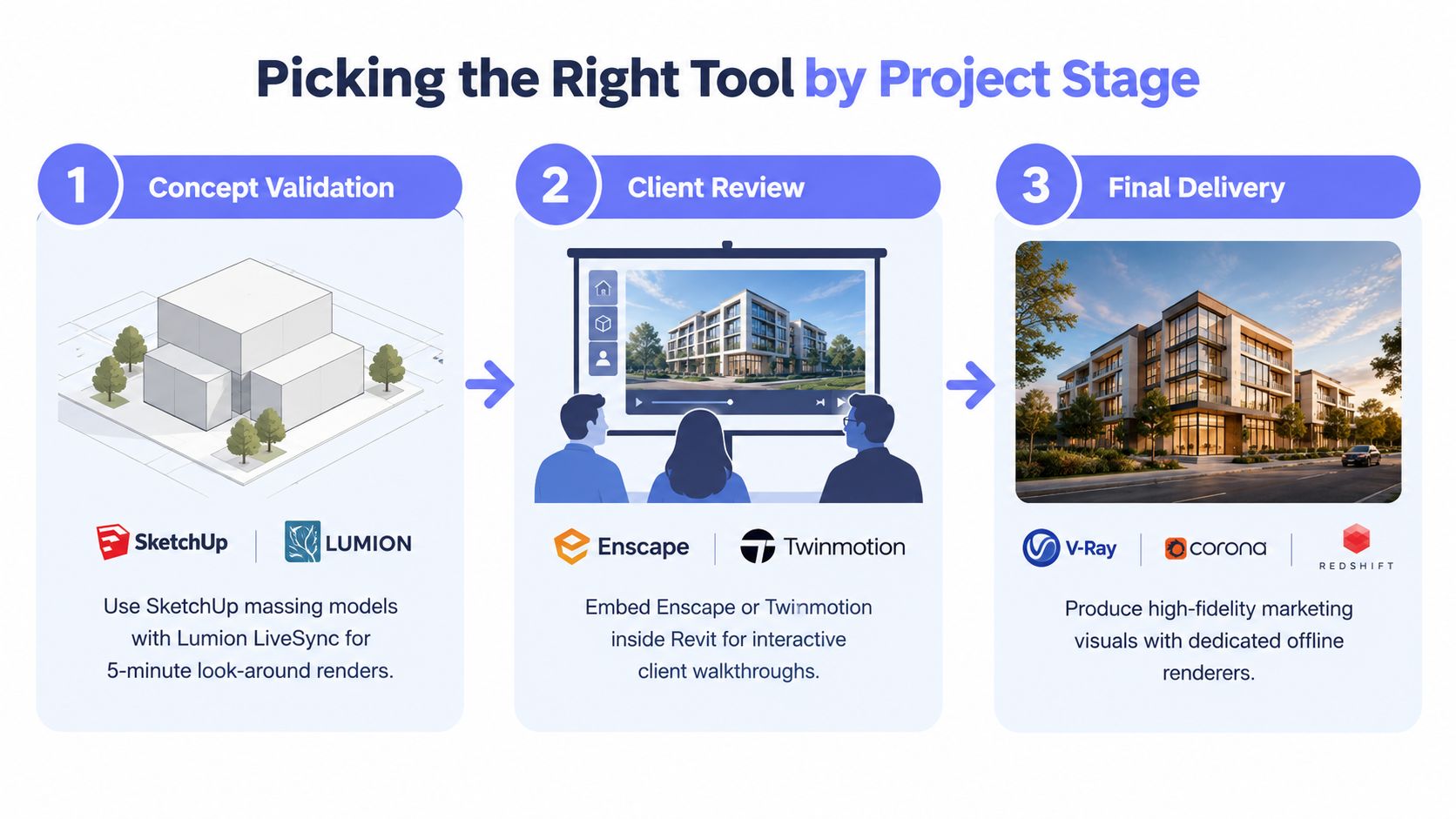
Concept validation
At concept stage, speed beats polish. You're trying to test whether the layout reads, the massing works, and the basic material direction makes sense. Lightweight real-time tools and fast cloud workflows are useful here because they let the team produce options without heavy scene assembly.
For plan-led communication, ISO Mapper fits well. It turns 2D floor plans into 3D isometric visuals, with generation time depending on the source and model, works through the browser, and is priced on the same subscription structure noted earlier. It's a better fit for quick floor-plan visuals than for fully art-directed hero images.
Client review
Client review is where Enscape, Twinmotion, and similar tools usually make the strongest case. Their job is not perfect cinema-grade output. Their job is to keep the meeting moving.
If the discussion involves material swaps, layout clarifications, or viewpoint changes, real-time navigation is more valuable than squeezing out the last bit of photorealism. A still image can impress a client. A responsive walkthrough can resolve uncertainty.
Marketing stills and virtual staging
Marketing stills still belong to offline renderers when image quality is the actual product. If the visual will end up in a brochure, investor deck, sales portal, or awards submission, V-Ray or Corona is usually the safer choice because they give the artist more control.
Virtual staging sits somewhere between production rendering and content generation. When the job is to restyle room imagery or produce multiple interior directions quickly, teams often benefit from dedicated workflows rather than building every room from scratch in a general-purpose renderer.
Isometric site plans and quick communication visuals
This is the category that many studios under-resource. They use expensive render workflows for outputs that are really communication graphics.
That's inefficient. Isometric site plans, cutaway diagrams, floor-plan visuals, and fast alternates usually need consistency and speed more than bespoke rendering control. The right tool here is often the one with the shortest path from drawing to shareable visual.
A Recommended Hybrid Stack for Studios in 2026
The strongest setup for most studios isn't one platform. It's a stack.
A practical 2026 baseline is simple: one real-time tool for live review, one offline renderer for final stills, your core BIM or modeling environment as the source of truth, and one cloud-native layer for plan-based visuals and fast alternates.
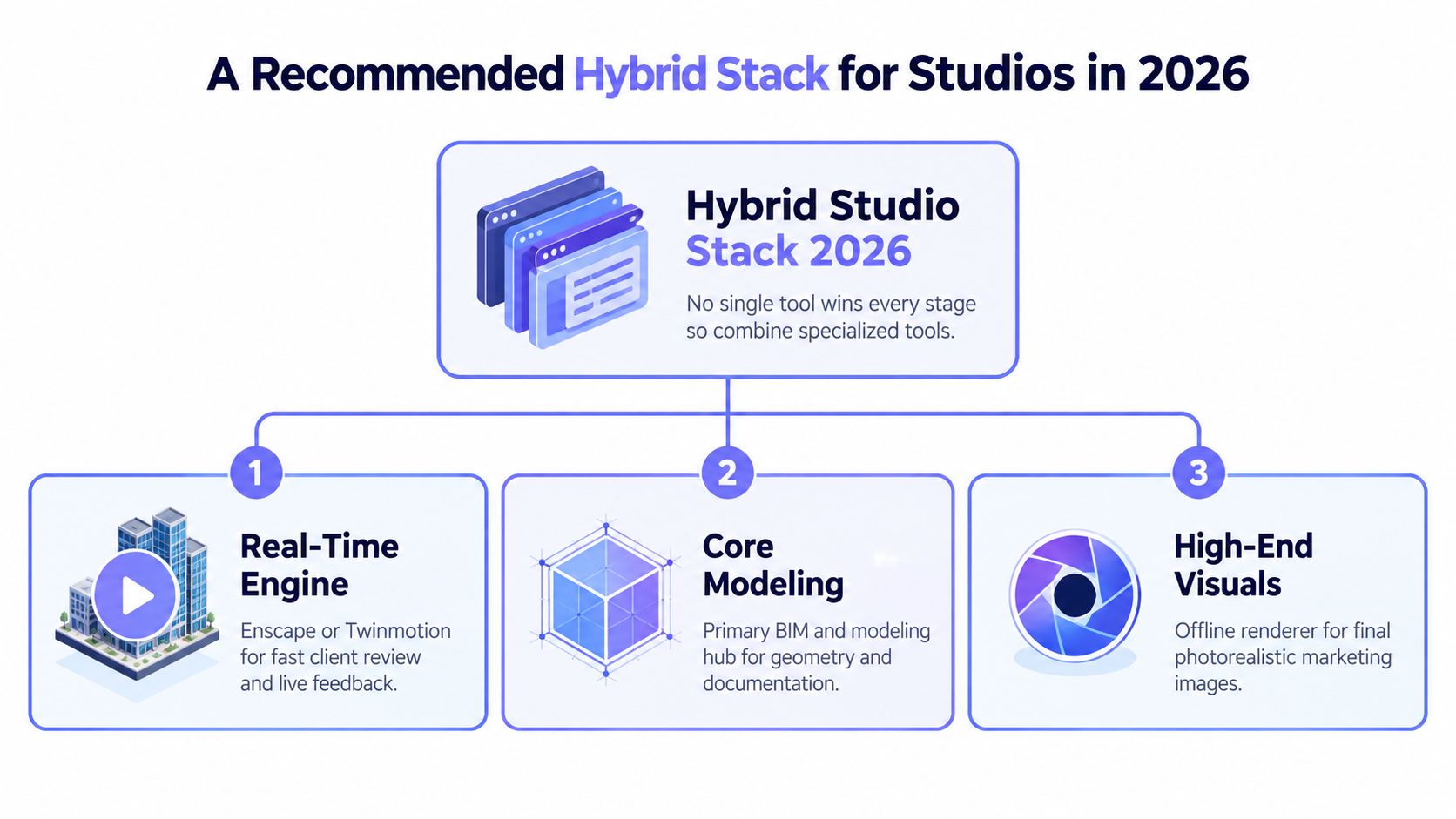
What that stack looks like in practice
A lean studio setup might look like this:
- Real-time review layer: Enscape or Twinmotion for live meetings and internal approvals
- Core modeling layer: Revit, SketchUp, Rhino, or Archicad for geometry and documentation
- Final render layer: V-Ray or Corona for locked marketing views
- Cloud utility layer: fast plan-to-visual tools, interior restyling, and quick diagram output
That arrangement is usually more stable than forcing one renderer to cover every deliverable.
Where cloud-native AI tools actually fit
The useful role of AI-native architecture tools isn't “replace your renderer.” It's “remove unnecessary setup from repeatable tasks.”
Vizcraft offers ISO Mapper for floor-plan isometric views, Interior Design for boards from floor plans, and Exterior Studio for exterior concepts from photos. These images support design discussion; verify dimensions, openings, scale, and construction intent against the source drawings.
Competitors like InteriorAI, RoomGPT, ArchiVinci, mnml.ai, Decor8, ReimagineHome, Collov, and PromeAI sit in this wider category too, but they're not substitutes for a production renderer in the final-frame part of the pipeline.
The right hybrid stack reduces handoff pain. It doesn't chase novelty.
The stack I'd recommend by default
For most firms, the safe default is this: real-time for approvals, offline for hero stills, and cloud-native tools for fast communication artifacts that don't warrant a full rendering setup.
If you're pricing or expanding the final-image side of that stack, the photorealistic rendering software 2026 guide is a helpful companion. For the plan-based side, the low-risk test is straightforward: try it with 2 free credits, no card required through the matching architectural floor plan use case workflow before you commit to another seat.
Frequently Asked Questions
How much does professional 3D architectural visualisation software usually cost per year?
It depends on the stack. A studio using a real-time review tool, an offline renderer, and some cloud generation will usually spend across software seats, hardware renewal, and occasional external rendering capacity rather than in one neat line item. For cloud-native plan visuals, the published pricing discussed earlier starts at $19 per month, with higher tiers at $49 and $99 depending on render volume.
Do you need a powerful GPU for architectural visualization?
For real-time engines and offline local rendering, yes, a capable GPU usually matters because viewport responsiveness and render speed both depend on it. Browser-based cloud tools are different because they don't require a local render machine in the same way, which can be useful for non-visualizer staff or lightweight laptops.
Have real-time tools replaced offline renderers for final hero images?
Not completely. Real-time tools are excellent for reviews, walkthroughs, and many presentation visuals, but offline renderers still offer the highest control ceiling for polished marketing stills and lighting-sensitive shots. Most studios that care about both speed and image quality still use both.
What does ISO Mapper do, and how is it different from a full renderer?
ISO Mapper is a floor-plan-to-visual tool. It turns 2D plans into 3D isometric visuals quickly, rather than asking the team to build a full custom 3D scene first. It accepts common image uploads such as JPG, PNG, HEIC, and WebP, and it's better treated as a fast communication layer than as a replacement for V-Ray, Enscape, or Twinmotion.
Is there a low-risk way to test this kind of tool before paying?
Yes. The platform offers 2 free credits on signup with no credit card required, which is enough to test whether plan-based visuals belong in your workflow before you add another subscription. If you're budgeting a full stack, go back to the earlier cost comparison and separate review, final-frame, and plan-visual needs before you buy anything.
Vizcraft focuses on the part of the workflow many studios still handle inefficiently: turning floor plans and room inputs into client-ready isometric maps, renders, and styled variations without local GPU setup. If your team needs faster plan visuals or quick presentation options alongside its existing renderer stack, it's easy to test the fit. Try it with 2 free credits, no card required.