Skip to content

Eco-modern house exterior AI rendering

Communicate natural cladding, deep overhangs, and crisp detailing with Vizcraft. Redesign a home's exterior from one photo in Exterior Studio.
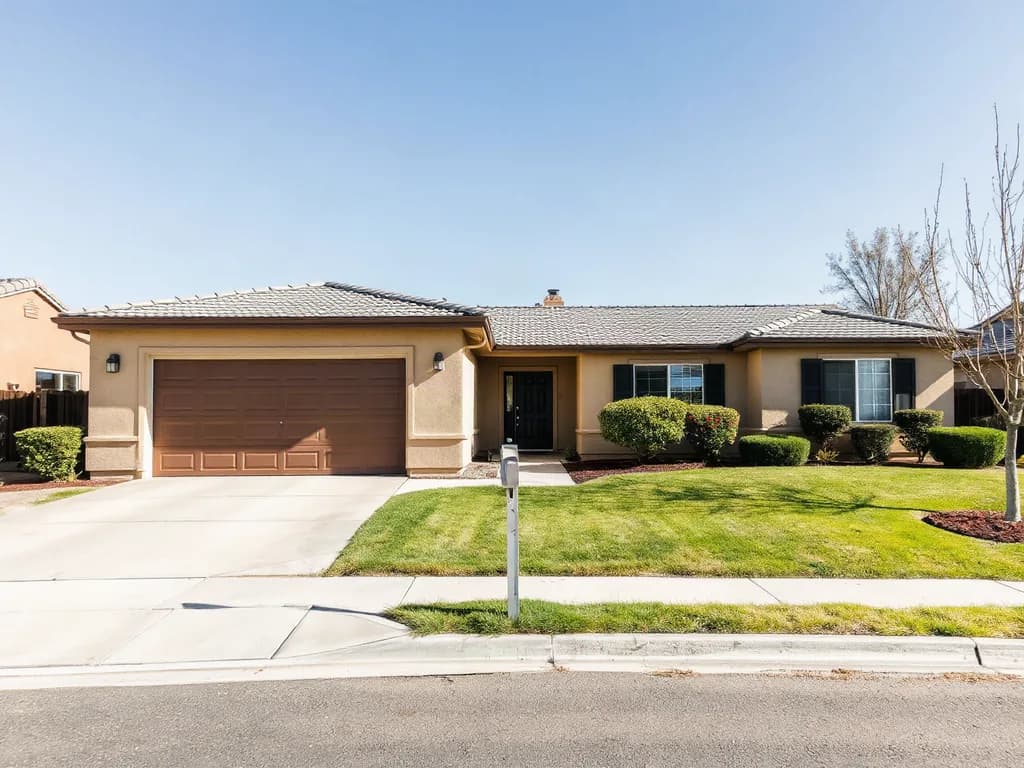
Photo of a single-storey ranch house seen from the street: beige stucco walls, a grey tile hip roof, a brown two-car garage door, a black front door, windows with black shutters, a lawn and a concrete driveway. It is a generated image of a fictional house.

In: a generated photo of a fictional house
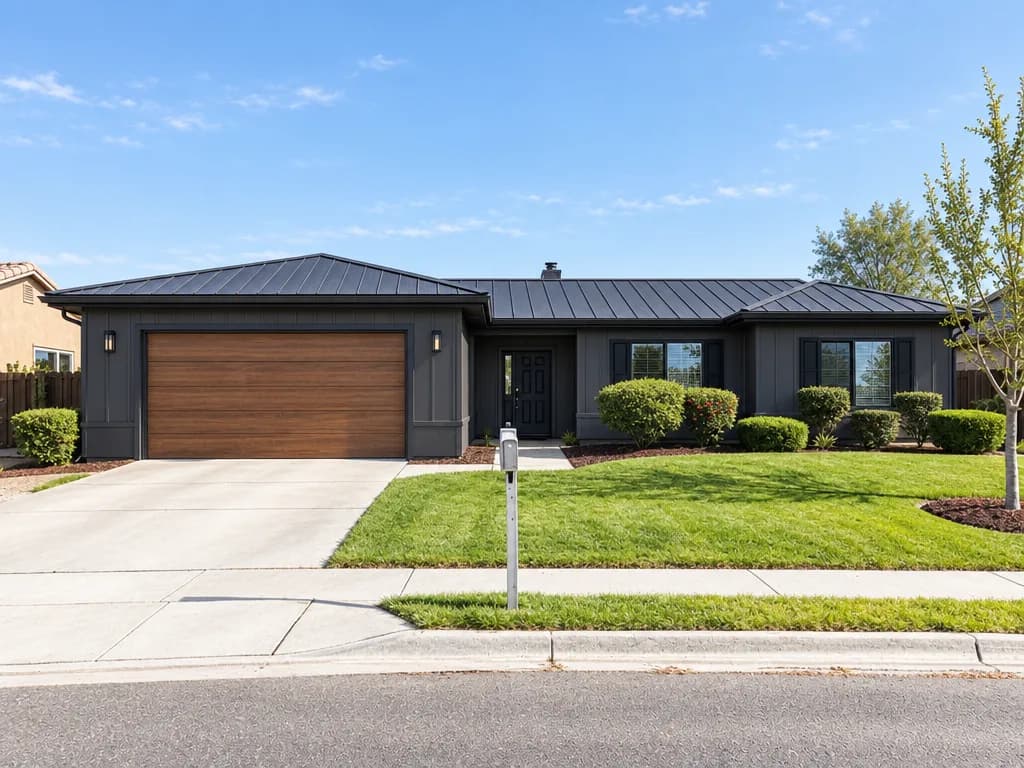
The same house after an Exterior Studio Contemporary remodel: charcoal panel siding, a black standing-seam metal roof, matte black window trim and a wood-look garage door. The lawn and driveway are kept.

Out: Contemporary remodel from Exterior Studio, 1 credit

Selected example, made with Vizcraft from the photo shown. Results vary with the photo you upload. The photo is a generated image of a fictional house. Exterior Studio: Contemporary, Remodel, morning light; siding, roof, window trim and garage door changed. Even with Landscaping on Keep, the photo's bare trees came back in leaf, as they did in every render we made.

Why use Vizcraft for this look

  • Start from Contemporary, Scandinavian, or Modern Farmhouse, then pick materials such as charcoal panel siding or a standing-seam metal roof.
  • Ideal for prefab brands and green developer pitches.
  • The Repaint and Remodel options aim to keep the roofline, windows, and doors as they are in the photo.
  • Supports climate-conscious pitch decks without a BIM model.

How to create this AI rendering

  1. Photograph the full envelope

    Show roof planes and shading devices so Exterior Studio can read the house before it redesigns it.

  2. Redesign it in Exterior Studio

    Upload the photo to Exterior Studio, pick a style direction, and describe wood-look cladding, deep overhangs, and crisp detailing in the notes.

  3. Review the renders

    Check each render against your plan or photo, then run it again or switch style until the finishes and materials fit the brief.

  4. Download the images

    Download the images from Vizcraft for client boards, proposals, or listing materials, with no render farm or 3D model.

Frequently asked questions

Will Vizcraft add solar panels?

Only as an impression: you can ask for them in the notes, but always engineer real PV layouts separately.

Can Vizcraft visualize rain screens?

As an impression, yes. Regenerate in Exterior Studio until the cladding depth reads the way you want, then detail the real assembly in your drawings.

Is eco-modern AI rendering credible for competitions?

Use Vizcraft renders as imagery alongside performance modeling data for juries.

Bring your own floor plan.

Try Vizcraft with your own floor plan or photo. 2 free credits, no card.