Visualización para construcción desde el plano
Alinea a las partes interesadas, los equipos de diseño y quienes toman las decisiones con imágenes claras que comunican la intención del diseño y aceleran las aprobaciones.

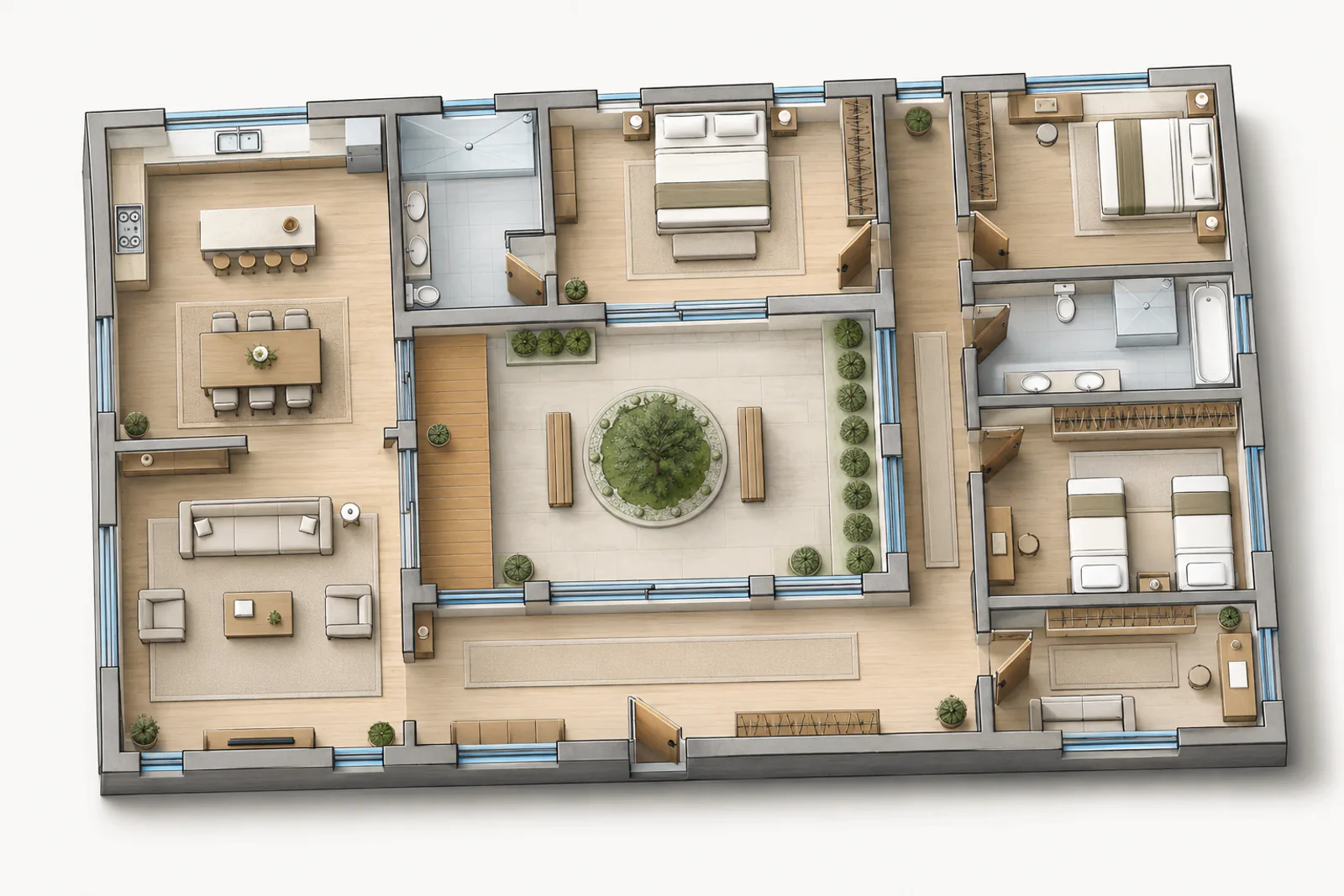
Ejemplo seleccionado, hecho con Vizcraft a partir del plano mostrado. Los resultados varían según el plano que subas. ISO Mapper, ajustes predeterminados.
La comunicación del diseño depende de la claridad. Cuando las partes interesadas, los directores de proyecto y los colaboradores de diseño interpretan los conceptos de forma distinta, llegan los malentendidos y los ciclos de revisión. Vizcraft ayuda a los equipos a comunicar antes la intención del diseño, convirtiendo planos en imágenes que todos pueden entender, desde los primeros conceptos hasta las presentaciones finales.
Con la visualización asistida por IA, los diseñadores pueden mostrar conceptos espaciales, comunicar acabados y facilitar las decisiones de diseño a las partes interesadas. En lugar de depender solo de bocetos abstractos o planos técnicos, los equipos pueden acompañar la visión del diseño con imágenes fotorrealistas que reducen la confusión y mantienen las aprobaciones dentro del calendario.
Por qué los equipos de construcción usan Vizcraft
Menos ciclos de revisión
Aporta referencias visuales para los conceptos espaciales. Cuando las partes interesadas ven cómo debería quedar el espacio terminado, bajan los problemas de interpretación y los comentarios se vuelven más concretos.
Apoyo a las decisiones de las partes interesadas
Muestra una habitación en dos o tres estilos de interiorismo, renderizada a partir del plano, para que quienes deciden comparen direcciones en contexto. Unas imágenes claras les ayudan a aprobar más rápido y con menos revisiones.
Colaboradores de diseño alineados
Usa imágenes fotorrealistas para aclarar las relaciones espaciales, la elección de materiales y la dirección del diseño. Estas imágenes hacen más productivas las reuniones de revisión y reducen los malentendidos.
Presentaciones de más nivel
Entrega material visual cuidado junto a la documentación del proyecto. Clientes y partes interesadas agradecen un resumen visual claro que da vida a los conceptos.
Claridad temprana para que el proyecto no se desvíe
Cuanto antes se alinean los equipos en la dirección del diseño, menos sorpresas aparecen después. Vizcraft ayuda a los equipos de diseño a visualizar los espacios clave, lo que permite revisar conceptos y obtener la aprobación de las partes interesadas antes de empezar el trabajo de detalle. Puedes mostrar cómo se sienten los espacios principales y cómo un interior complejo conecta con las zonas contiguas. Esa claridad reduce los cambios en fases posteriores y ayuda a proteger los plazos.
Cuando hacen falta alternativas de diseño, las imágenes ayudan a comunicar lo que se gana y lo que se pierde con cada una. Muestra un concepto base junto a una opción más elaborada para que las partes interesadas entiendan el impacto antes de decidir. Así la conversación se mantiene productiva y se reduce la probabilidad de cambios en las últimas fases.
Comunicación visual para equipos de proyecto
Los equipos de proyecto suelen trabajar con muchas partes interesadas, y las descripciones abstractas pueden ser difíciles de consensuar. Unas referencias visuales rápidas ayudan a todos a interpretar la intención del diseño, detectar desajustes y dar comentarios con claridad. Los renders de interiores ayudan a comunicar las transiciones entre acabados, la elección de materiales y los detalles espaciales clave.
Los directores de proyecto pueden compartir las imágenes en las reuniones de revisión, adjuntarlas a los briefs de diseño o usarlas en las actualizaciones para las partes interesadas. Cuando todos miran la misma referencia visual, las conversaciones avanzan rápido y las decisiones quedan registradas con claridad.
Conceptos espaciales y dirección del diseño
La visualización es esencial para comunicar las relaciones espaciales y la intención del diseño. Los renders dan a diseñadores y partes interesadas una referencia común para entender la distribución, la circulación, las transiciones entre materiales y la sensación general de un espacio. Cuando el equipo puede visualizar el concepto, detecta los problemas pronto y toma decisiones mejor informadas.
En proyectos con varias fases o grupos de interesados, unas imágenes rápidas ayudan a fijar expectativas sobre la dirección del diseño. Usa Vizcraft para mostrar cómo un pasillo conecta con los espacios contiguos o cómo se lee una paleta de materiales en todo un interior. Estas imágenes apoyan la comunicación con clientes y colaboradores, minimizan la confusión y reducen los ciclos de revisión.
Resultados centrados en el concepto
- Las mismas habitaciones renderizadas a partir del plano en dos estilos, para la aprobación de las partes interesadas.
- Vistas de contexto espacial para apoyar las revisiones de diseño.
- Imágenes de concepto de interiores para las zonas de diseño complejas.
- Respuestas visuales a preguntas de diseño para alinearse más rápido.
- Imágenes de presentación que comunican la visión final.
Mantén los proyectos en marcha con una comunicación más clara
El diseño es una cadena de decisiones. Vizcraft ayuda a que cada decisión esté respaldada por imágenes que reducen la ambigüedad. Eso significa menos ciclos de revisión, una comunicación más clara con las partes interesadas y un camino más fluido hacia la aprobación. Cuando la claridad visual forma parte del proceso, los proyectos cumplen el calendario y los equipos pueden centrarse en el trabajo que importa.
Si tu equipo ya trabaja con planos detallados o modelos BIM, Vizcraft aporta valor traduciendo la complejidad en imágenes que alinean a quienes toman las decisiones. Es una capa práctica que te ayuda a mantener los proyectos alineados sin alterar los flujos de trabajo existentes.
Los responsables de diseño también usan la plataforma para documentar hitos clave para las partes interesadas y los informes internos. Unos puntos de control visuales rápidos hacen más eficientes las reuniones de revisión, sobre todo cuando participantes a distancia necesitan entender bien el espacio. Al acompañar las actualizaciones de diseño con contexto visual, los equipos mantienen el impulso y reducen la fricción que suele frenar las aprobaciones. Esta claridad refuerza la confianza y mantiene las expectativas alineadas desde el concepto hasta la entrega.
¿Listo para alinear el diseño más rápido?
Crea una cuenta gratuita de Vizcraft y aporta claridad visual a tu próximo proyecto.